

Choosing the right material
Choosing the right filament is one of the most important decisions in 3D printing. Every material has unique properties - strength, flexibility, heat resistance, and ease of printing - and picking the wrong one leads to failed or disappointing prints. For example:- PLA is great for aesthetic models but too brittle for moving parts.
- PETG or ABS are better for a phone mount that needs strength and heat resistance.
- The wrong filament causes warping and cracking (ABS with no enclosure), poor adhesion (Nylon on a cold bed), or deformation under heat (PLA in a hot car).
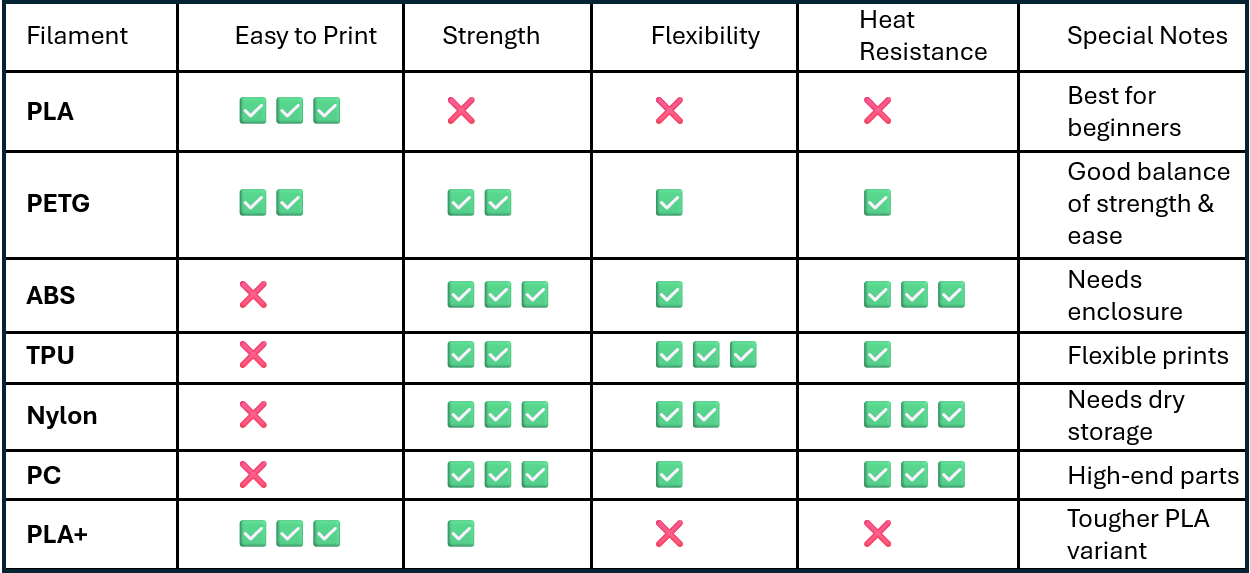
Quick comparison of common filament types
Understanding each material’s strengths and limits saves you wasted time, filament, and frustration. Match the material to where the part will actually be used.
The filaments
PLA (Polylactic Acid)
PLA (Polylactic Acid)
The easiest and most beginner-friendly filament, made from plant starch and biodegradable.
- Pros: Easy to print, low warping, excellent surface finish, no heated bed strictly required, biodegradable
- Cons: Brittle, poor heat resistance (softens near 60 C), not for mechanical parts
- Best for: Prototypes, toys, decorative items, low-stress parts, classroom use
- Nozzle: 190 - 220 C (start at 200 C)
- Bed: 50 - 65 C (start at 60 C)
- Cooling: Strong part cooling
PETG (Polyethylene Terephthalate Glycol)
PETG (Polyethylene Terephthalate Glycol)
A tough, water-resistant middle ground between PLA and ABS.
- Pros: Strong, slightly flexible, good layer adhesion, water resistant, better heat resistance than PLA
- Cons: Prone to stringing, harder to dial in, absorbs moisture
- Best for: Mechanical parts, food-safe containers, brackets, outdoor items
- Nozzle: 220 - 250 C (start at 235 C)
- Bed: 70 - 90 C (start at 80 C)
- Cooling: Low or none (30 - 50% fan max)
ABS (Acrylonitrile Butadiene Styrene)
ABS (Acrylonitrile Butadiene Styrene)
Strong and heat-resistant, but demanding to print.
- Pros: Strong, durable, heat resistant, can be smoothed with acetone
- Cons: Warps easily, emits fumes, needs a heated bed and an enclosure
- Best for: Functional parts, enclosures, automotive components, snap-fit assemblies
- Nozzle: 230 - 250 C (start at 240 C)
- Bed: 90 - 110 C (start at 100 C)
- Cooling: Minimal
TPU (Thermoplastic Polyurethane)
TPU (Thermoplastic Polyurethane)
A flexible, rubber-like filament.
- Pros: Flexible, impact and abrasion resistant, good layer adhesion
- Cons: Slow and tricky to print, works best with a direct-drive extruder
- Best for: Phone cases, gaskets, seals, wearables, vibration dampers
- Nozzle: 210 - 230 C (start at 220 C)
- Bed: 40 - 60 C (start at 50 C)
- Cooling: Low to moderate
Nylon (Polyamide)
Nylon (Polyamide)
Extremely strong and durable, but very sensitive to moisture.
- Pros: Very strong, high impact and abrasion resistance, flexible yet structural, high heat resistance
- Cons: Absorbs moisture very quickly, warps without a heated bed and enclosure, expensive
- Best for: Gears, hinges, bushings, functional mechanical parts
- Nozzle: 240 - 260 C (start at 250 C)
- Bed: 70 - 100 C (start at 90 C)
- Cooling: Minimal to none
Polycarbonate (PC)
Polycarbonate (PC)
One of the strongest and most heat-resistant common filaments.
- Pros: Extremely strong and heat resistant, excellent impact resistance, slight flex under stress
- Cons: Needs very high temperatures, warps easily, absorbs moisture, hard to dial in
- Best for: Engineering prototypes, high-temperature parts, load-bearing components
- Nozzle: 250 - 300 C (start at 270 C)
- Bed: 90 - 110 C (start at 100 C)
- Cooling: None
PLA+ / Tough PLA
PLA+ / Tough PLA
An upgraded PLA that keeps the easy printing but adds toughness.
- Pros: Stronger and less brittle than standard PLA, easy to print, good surface quality
- Cons: Still poor heat resistance, slightly more expensive
- Best for: Stronger functional parts, upgraded decorative prints, entry-level mechanical parts
- Nozzle: 205 - 225 C (start at 210 C)
- Bed: 50 - 70 C (start at 60 C)
- Cooling: Benefits from cooling
HIPS (High Impact Polystyrene)
HIPS (High Impact Polystyrene)
Often used as a dissolvable support material for ABS.
- Pros: Dissolves in limonene, similar strength to ABS
- Cons: Rarely used on its own, needs a heated bed and enclosure
- Best for: Dissolvable supports in dual-extrusion ABS prints, lightweight structural parts
- Nozzle: 230 - 245 C (start at 235 C)
- Bed: 90 - 110 C (start at 100 C)
- Cooling: None or low
Temperature quick reference
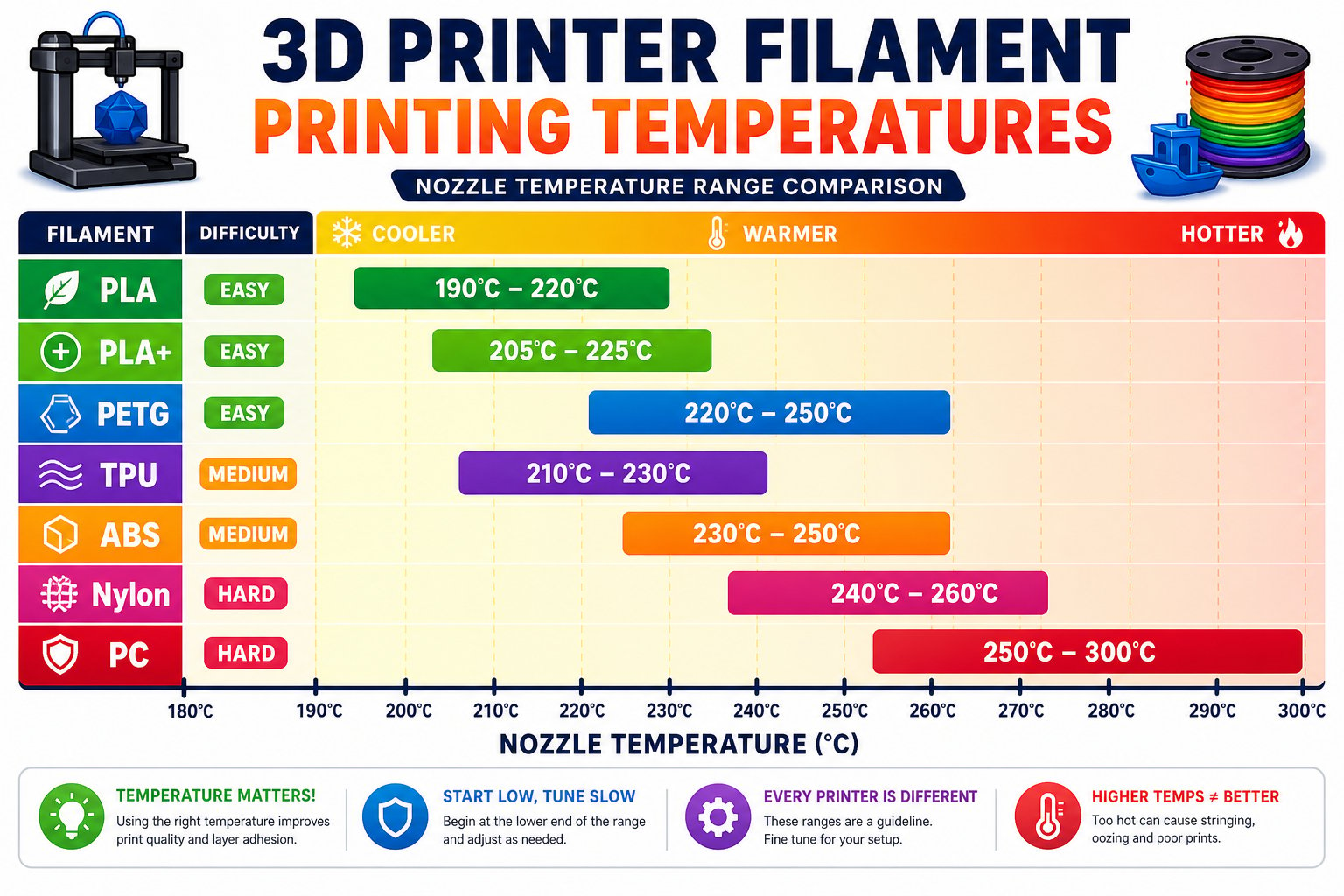
Nozzle temperature ranges by filament type
How to choose
Learning or decorative?
Choose PLA or PLA+. Easy, forgiving, and great-looking.
Functional or outdoor?
Choose PETG. Strong, durable, and water resistant without an enclosure.
Flexible?
Choose TPU. Rubbery and impact resistant - print it slowly.
You can match a filament to a job and know its rough nozzle and bed temperatures. For this camp, PLA is your go-to material.