

Hacking the human
You can spend millions on firewalls, encryption, and intrusion detection systems - and an attacker can bypass all of it with a single phone call. Social engineering is the art of manipulating people into giving up confidential information, granting access, or performing actions that compromise security. It exploits human psychology - not technology.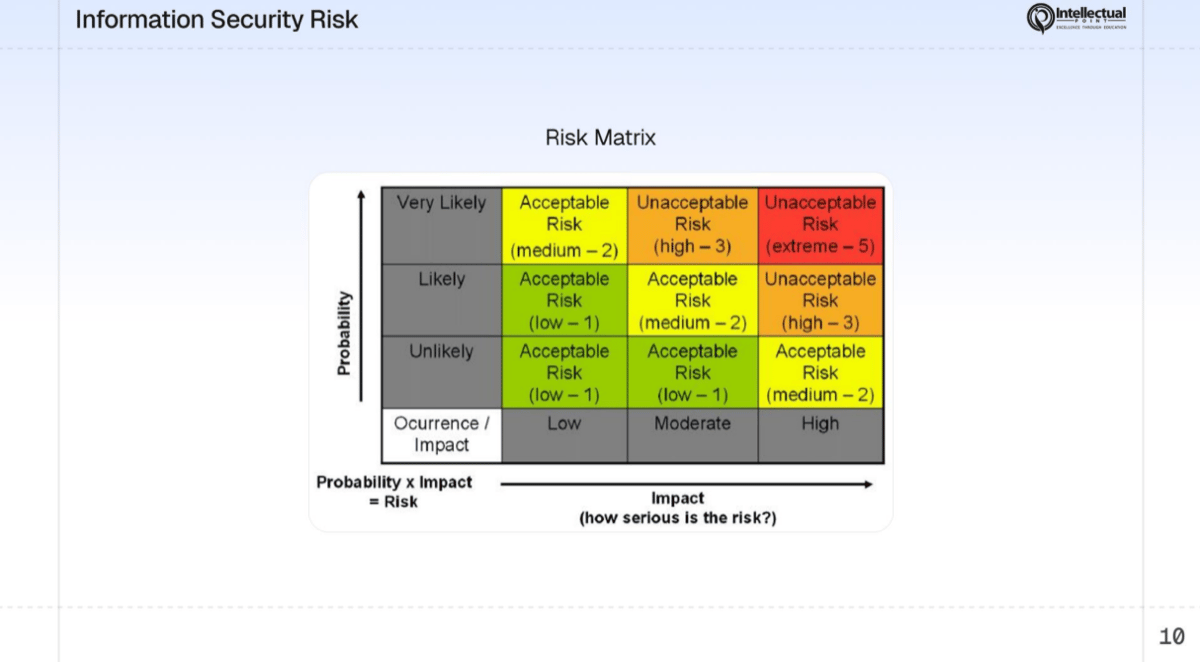
Risk matrix - social engineering attacks are high probability and high impact
Why social engineering works
Social engineers exploit fundamental aspects of human psychology. Understanding why these attacks work is the first step to defending against them.Social engineers study human behavior the way a hacker studies code. They look for predictable patterns they can exploit - and humans are remarkably predictable.
Types of social engineering attacks
Phishing
The most common cyberattack in the world. Phishing uses mass emails designed to look like they come from a trusted source - your bank, a major retailer, a social media platform - to trick you into clicking a malicious link or entering your credentials on a fake website. How it works:- You receive an email that appears to be from a trusted company
- The email warns of a problem or offers something enticing
- You click a link that leads to a fake login page
- You enter your credentials - which go directly to the attacker
Spear-phishing
A targeted version of phishing aimed at a specific person. The attacker researches their victim and crafts a personalized message that is much harder to detect than mass phishing. What makes it different from phishing:- Uses the target’s real name, job title, and company
- References real projects, colleagues, or events
- May come from a spoofed email address of someone the target knows
- Has a much higher success rate because it feels personal and legitimate
Vishing
Voice phishing - social engineering over the phone. The attacker calls you and pretends to be someone in authority. Common vishing scenarios:- “This is the IRS. You owe back taxes and a warrant has been issued for your arrest unless you pay immediately.”
- “Hello, this is IT support. We detected malware on your computer. I need your password to run a remote scan.”
- “This is your bank’s fraud department. We’re seeing suspicious activity - can you verify your account number and PIN?”
Vishing can be extremely convincing because hearing a human voice triggers trust. Attackers may use caller ID spoofing to make it look like the call is coming from a legitimate number.
Smishing
SMS phishing - phishing via text message. Short, urgent messages with malicious links. Example text messages:- “USPS: Your package could not be delivered. Schedule redelivery: [malicious link]”
- “Your bank account has been temporarily locked. Verify here: [malicious link]”
- “Congratulations! You’ve won a $500 gift card. Claim now: [malicious link]“
Pretexting
Creating a fabricated scenario (a pretext) to gain the victim’s trust and extract information or access. The attacker invents an identity and a reason for their request. How it works:- The attacker creates a believable persona and backstory
- They approach the target with a plausible reason for their request
- They build trust through conversation
- They extract information or access
Donuts & Dragons connection: In your wargame, the “Impersonator” attack is a pretexting scenario. Someone shows up at Donuts & Dragons claiming to be a health inspector and demands access to the back-of-house area, the kitchen, and the network closet. If no one verifies their identity, the attacker gains physical access to everything.
Baiting
Leaving something tempting - usually a physical device - where a target will find it and use it. The classic example: An attacker drops USB drives labeled “Q4 Salary Report - CONFIDENTIAL” in the parking lot of a target company. Human curiosity is powerful - someone picks one up and plugs it into their work computer. The USB drive contains malware that installs automatically. Digital baiting includes:- Free software downloads that contain hidden malware
- “Free movie” or “free game” links that install trojans
- Fake online tools that harvest credentials
Tailgating and piggybacking
Gaining physical access to a secured area by following an authorized person through a controlled entry point.- Tailgating: Following closely behind someone who badges into a building - they don’t know you’re there
- Piggybacking: The authorized person knowingly holds the door for you - often out of politeness
Quid pro quo
Offering something in exchange for information or access. The attacker provides a “service” that requires the victim to share sensitive information. Example: An attacker calls employees at random, posing as IT support: “Hi, we’re rolling out a new security update. I can install it for you right now if you give me your login credentials so I can remote in.” The employee gets “free tech support” - the attacker gets valid credentials.Watering hole
Compromising a website that the target frequently visits, then using it to deliver malware to the target. How it works:- The attacker identifies websites their target regularly visits (industry forums, news sites, professional associations)
- The attacker compromises one of those websites by injecting malicious code
- When the target visits the site, the malicious code exploits a browser vulnerability and installs malware
Watering hole attacks are named after the predator strategy of ambushing prey at a water source. The attacker doesn’t go to the victim - they wait where the victim will come.
The Donuts & Dragons pretexting attack
In the Donuts & Dragons wargame, your team faces a pretexting scenario that mirrors real-world attacks on businesses.1
The setup
Someone arrives at your Donuts & Dragons shop claiming to be a health inspector from the county. They have a clipboard, a badge that looks official, and a confident demeanor.
2
The request
They ask to inspect the kitchen, food storage areas, and “the utility room where you keep the electrical panels.” That utility room also happens to contain your network equipment.
3
The risk
If your staff lets them in without verification, the “inspector” could:
- Plant a rogue device on your network
- Photograph sensitive information
- Access the POS system
- Install a keylogger on a workstation
4
The defense
Your team should have a visitor verification policy: call the county health department directly (using a number you look up yourself - not one the visitor provides) to confirm the inspection is legitimate before granting any access.
How to defend against social engineering
No technology can fully prevent social engineering. The primary defense is educated, skeptical people.Security awareness training
The single most effective defense. Regular training that teaches employees to recognize and report social engineering attempts. Include phishing simulations to test readiness.
Verify through a separate channel
If someone calls claiming to be IT support, hang up and call IT directly using the number you already have. If an email claims to be from your boss, walk over and ask them. Never use contact information provided by the requester.
Question urgency and authority
Legitimate requests can wait for verification. If someone is pressuring you to act immediately, that pressure is itself a red flag. Real authority figures will understand if you verify their identity.
Report suspicious contacts
Create a culture where reporting suspicious emails, calls, or visitors is encouraged - not punished. One report could prevent a breach that affects the entire organization.
Quick reference: social engineering red flags
- Unsolicited contact (email, call, text) requesting sensitive information
- Urgency or pressure to act immediately
- Requests to bypass normal procedures
- Threats of negative consequences for non-compliance
- Offers that seem too good to be true
- Requests to keep the interaction secret
- Contact information that doesn’t match official records
- Emotional manipulation (flattery, sympathy, intimidation)
Exercise: identify the technique
Read each scenario and identify which social engineering technique is being used.Scenario 1
Scenario 1
You receive a text message: “Amazon: Your order #3847291 has been delayed. Confirm your delivery address here: [link]”Answer: Smishing. This is a phishing attack via SMS. The link leads to a fake Amazon page designed to steal your credentials or personal information.
Scenario 2
Scenario 2
Someone in a delivery uniform approaches the office door carrying a large package. They ask an employee to hold the door open because “my hands are full and I need to get this to the second floor.”Answer: Piggybacking. The employee knowingly holds the door for someone who hasn’t authenticated. The uniform and package build trust.
Scenario 3
Scenario 3
You get a call from someone claiming to be from Microsoft: “We’ve detected a virus on your computer. If you give me remote access, I can remove it for free right now.”Answer: Vishing combined with quid pro quo. The attacker offers a service (free virus removal) in exchange for remote access to your computer. The phone call makes it vishing.
Scenario 4
Scenario 4
You find a USB drive in the break room labeled “Employee Bonus Structure 2026 - CONFIDENTIAL.”Answer: Baiting. The label is designed to trigger curiosity. If you plug it into your computer, the drive could install malware automatically.
Scenario 5
Scenario 5
An email arrives from your company’s CEO: “I’m in a meeting and can’t talk. I need you to purchase 10 gift cards worth $200 each and send me the codes immediately. This is urgent and confidential.”Answer: Spear-phishing combined with pretexting. This is a business email compromise (BEC) attack. The attacker impersonates an authority figure, creates urgency, and requests secrecy - three major red flags.
Scenario 6
Scenario 6
An attacker learns that employees at a law firm frequently visit a specific legal news website. They hack the website and inject code that installs a keylogger on visitors’ computers.Answer: Watering hole attack. The attacker compromises a site the targets already trust and visit regularly instead of approaching them directly.