

Attacks that target applications and infrastructure
Social engineering targets people. The attacks in this lesson target the applications and infrastructure those people build and use. You will learn how three of the most common technical attacks work, why they succeed, and how to defend against them.SQL injection
How a web application works
Before you can understand SQL injection, you need to understand how most web applications are built.1
Front end (what you see)
The web page you interact with - the forms, buttons, and text boxes. Built with HTML, CSS, and JavaScript. This runs in your browser.
2
Web server (the middleman)
Receives your input from the front end, processes it, and communicates with the database. Built with languages like Python, Java, PHP, or Node.js.
3
Database (where data lives)
Stores all the application’s data - user accounts, orders, products, messages. Communicates using SQL (Structured Query Language).
What is SQL?
SQL (Structured Query Language) is how applications talk to databases. Every time you log in, search for a product, or view your profile, a SQL query runs behind the scenes. A simple login query looks like this:users table where the username is student AND the password is pass123.” If a matching row is found, the login succeeds.
The Tiffany analogy
Think of it this way: Tiffany works the register at a retail store. When a customer gives her an order number, she looks it up in the inventory system and retrieves the item. Tiffany always does exactly what the customer asks - she doesn’t question the input. If a customer says “Give me order #1234,” she types it in. But what if a customer says:“Give me order #1234 and also every other order in the system”If Tiffany doesn’t validate the request, she might hand over the entire inventory. That is SQL injection.
How SQL injection works
SQL injection happens when an attacker inserts malicious SQL code into an input field, and the application includes that input directly in a database query without checking it. Normal login:student and pass123) and drops it into the query template. Everything works as expected.
Malicious login - the attacker types this as their username:
The database evaluates: “Find rows where the username is empty OR where 1 equals 1.” Since 1 always equals 1, every row in the table matches. The attacker is logged in - often as the first user in the database, which is frequently the administrator.
What an attacker can do with SQL injection
- Bypass authentication - log in as any user without knowing their password
- Steal data - extract entire database tables (usernames, passwords, credit cards, personal information)
- Modify data - change prices, alter account balances, elevate privileges
- Delete data - drop entire database tables, destroying the application
- Execute system commands - in severe cases, take control of the database server itself
Defenses against SQL injection
Input validation
Check every user input before using it. Reject input that contains SQL characters like single quotes, semicolons, or double dashes.
Parameterized queries
Separate the SQL code from the user input. The database treats user input as data, never as code - eliminating injection entirely.
Least privilege
The database account used by the web application should have the minimum permissions needed. A read-only account can’t delete tables even if an injection succeeds.
Web application firewall
A WAF sits between users and the web server, filtering out requests that contain known attack patterns like SQL injection strings.
%s placeholders tell the database: “Whatever value goes here, treat it as a string - never as SQL code.” Even if the attacker types ' OR '1'='1' -- as the username, the database searches for a user literally named ' OR '1'='1' -- - and finds nothing.
Cross-site scripting (XSS)
How the web page works
Every web page you visit is built from three technologies: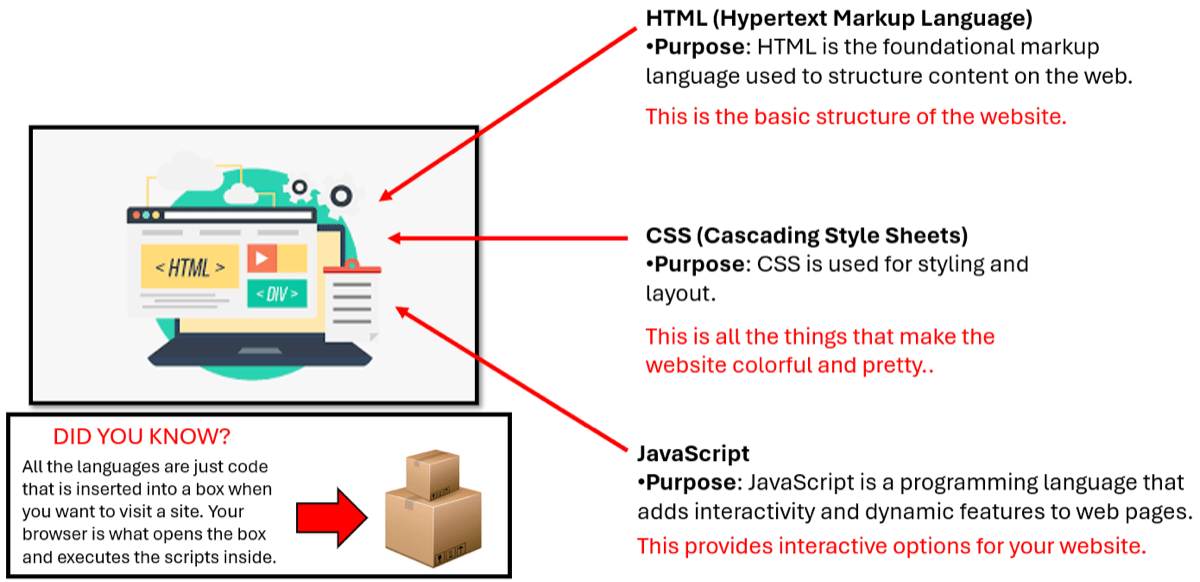
How websites work - HTML provides structure, CSS provides styling, and JavaScript provides interactivity
Your browser downloads all three and executes them. This includes any JavaScript on the page - which is where XSS attacks live.
What is XSS?
Cross-site scripting (XSS) happens when an attacker injects malicious JavaScript into a web page that is then executed by other users’ browsers. The attack exploits the trust a user has in a website - you trust that the code running on a website is the website’s own code, but with XSS, some of it belongs to the attacker.How XSS works
Imagine a blog with a comments section. When you post a comment, it is saved to the database and displayed to every visitor. The application takes your comment and inserts it directly into the page’s HTML. A normal comment:<p>Great article! Very helpful.</p> - no problem.
A malicious comment:
Types of XSS
- Stored XSS
- Reflected XSS
- DOM-based XSS
The malicious script is permanently saved on the target server - in a database, comment field, forum post, or user profile. Every user who views the affected page executes the malicious code.Example: An attacker posts a comment containing a malicious script on a popular forum. Every person who reads that comment executes the script and has their session cookie stolen.Why it’s dangerous: One injection can affect thousands of users.
What an attacker can do with XSS
- Session hijacking - steal session cookies to impersonate the user
- Account takeover - change passwords, email addresses, or security settings
- Credential theft - inject fake login forms on trusted websites
- Defacement - alter the appearance of the web page
- Malware distribution - redirect users to malicious download pages
- Keylogging - capture everything the user types on the page
Defenses against XSS
Output encoding
Convert special characters like
<, >, and " into their HTML entity equivalents (<, >, ") before rendering them. The browser displays them as text instead of executing them as code.Content Security Policy (CSP)
A browser security feature that restricts which scripts can run on a page. You can tell the browser: “Only execute JavaScript from my own domain - ignore everything else.”
Input validation
Validate and sanitize all user input on the server side. Strip or reject HTML tags and JavaScript code from text inputs.
HttpOnly cookies
Mark session cookies as
HttpOnly so that JavaScript cannot access them. Even if an XSS attack executes, it cannot steal the session cookie.Denial of service (DoS and DDoS)
What is a denial-of-service attack?
A denial-of-service (DoS) attack overwhelms a target system with so much traffic or so many requests that legitimate users can no longer access it. The goal is not to steal data - it is to make the service unavailable.The Donuts & Dragons analogy
Imagine 10,000 people call Donuts & Dragons at the exact same time. Every phone line is occupied by a fake caller. Real customers who want to place orders hear nothing but a busy signal. The restaurant’s phones still work - they’re just too overwhelmed to serve anyone. That is a denial-of-service attack.DoS vs. DDoS
- DoS (single source)
- DDoS (distributed)
A single attacker sends a flood of traffic from one machine. Easier to stop because you can identify and block the source IP address.Analogy: One person calling the restaurant’s phone line over and over as fast as possible.
A botnet is a network of computers infected with malware that gives an attacker remote control. Botnet operators can rent out their networks to other criminals - you can buy a DDoS attack on the dark web for as little as $10 per hour.
Types of DoS/DDoS attacks
How a SYN flood works
The SYN flood is a classic protocol-level DoS attack that exploits the TCP three-way handshake.1
Normal TCP handshake
When you connect to a website, your computer sends a SYN (synchronize) packet. The server responds with SYN-ACK (synchronize-acknowledge). Your computer replies with ACK (acknowledge). Connection established.
2
The attack
The attacker sends thousands of SYN packets with fake return addresses. The server responds with SYN-ACK to each one and waits for the final ACK - which never comes because the return address is fake.
3
The result
The server’s connection table fills up with half-open connections. It has no room left for legitimate users. The service becomes unavailable.
Real-world DDoS attacks
GitHub (2018) - 1.35 Tbps
GitHub (2018) - 1.35 Tbps
In February 2018, GitHub was hit by the largest DDoS attack recorded at that time: 1.35 terabits per second of traffic. The attack used a technique called memcached amplification, where small requests to misconfigured servers generated massive responses directed at GitHub. GitHub’s DDoS mitigation service (Akamai Prolexic) absorbed the attack and restored service within 10 minutes.
Dyn DNS (2016) - Mirai botnet
Dyn DNS (2016) - Mirai botnet
In October 2016, the Mirai botnet attacked Dyn, a major DNS provider. The botnet was made up of hundreds of thousands of compromised IoT devices - security cameras, DVRs, routers - all sending traffic to Dyn’s DNS servers simultaneously. Because Dyn handled DNS for major websites, the attack took down Twitter, Netflix, Reddit, Spotify, and dozens of other services for most of a day.
Estonia (2007) - cyber warfare
Estonia (2007) - cyber warfare
In 2007, Estonia suffered weeks of DDoS attacks targeting government websites, banks, and media outlets. The attacks were widely attributed to Russia following a political dispute. This was one of the first examples of DDoS being used as a tool of geopolitical conflict and led to the establishment of NATO’s Cooperative Cyber Defence Centre of Excellence in Tallinn.
Defenses against DoS/DDoS
CDN / DDoS mitigation
Services like Cloudflare, Akamai, and AWS Shield absorb and filter attack traffic before it reaches your servers. They have the bandwidth capacity to handle volumetric attacks.
Rate limiting
Limit the number of requests a single IP address can make in a given time period. Prevents a single source from overwhelming the server.
Traffic analysis
Monitor network traffic patterns to detect anomalies. A sudden spike from thousands of sources to a single endpoint indicates a DDoS attack.
ISP filtering
Work with your internet service provider to filter malicious traffic upstream - before it even reaches your network.