> ## Documentation Index
> Fetch the complete documentation index at: https://stem-docs.intellectualpoint.com/llms.txt
> Use this file to discover all available pages before exploring further.
# Unbox and build your drone
> Check your kit, attach the propellers and guards the right way, and get your Echo Drone flight-ready.
## Build it right, fly it well
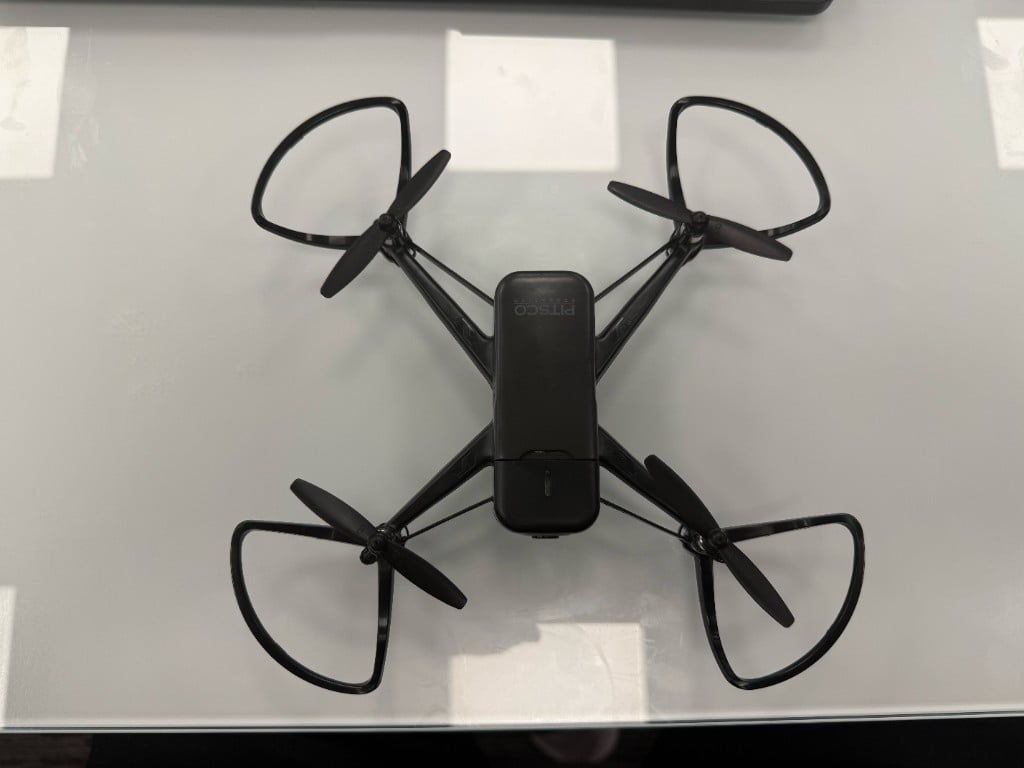
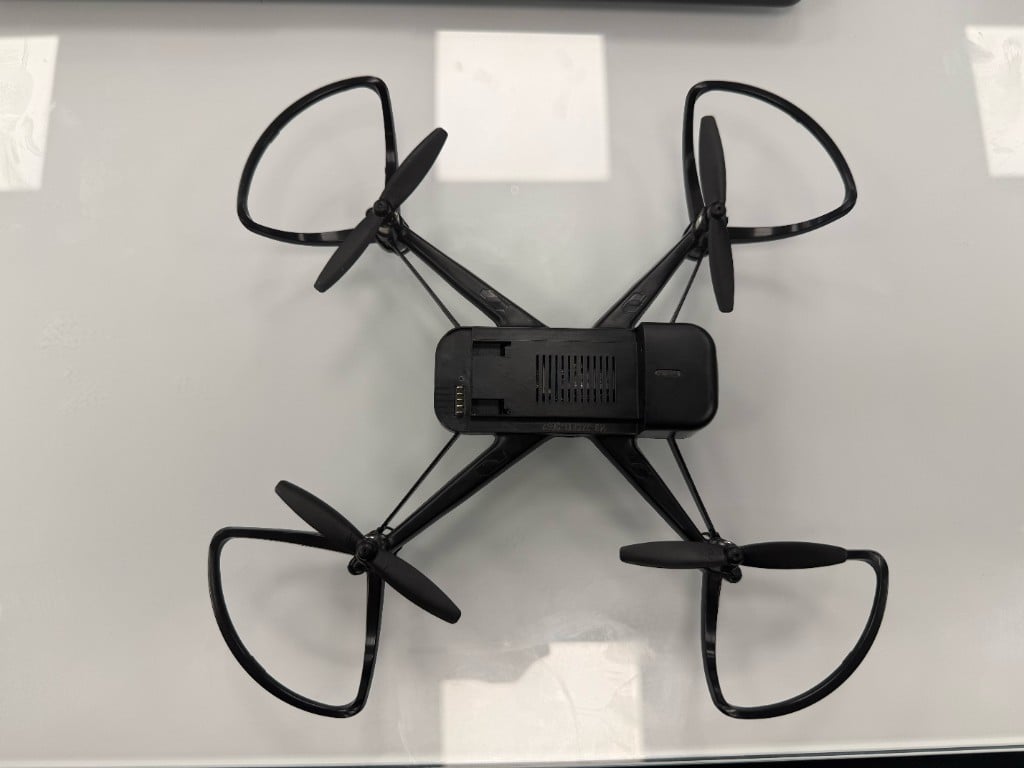
Your Echo Drone arrives mostly assembled - your job is to fit the propellers and guards correctly, install the battery, and power up. Getting the propellers in the right spots is the single most important step: a mixed-up propeller means a drone that won't fly.
 ## Check your kit
Lay everything out first - it's easier to spot a missing piece now than mid-build.
## Check your kit
Lay everything out first - it's easier to spot a missing piece now than mid-build.
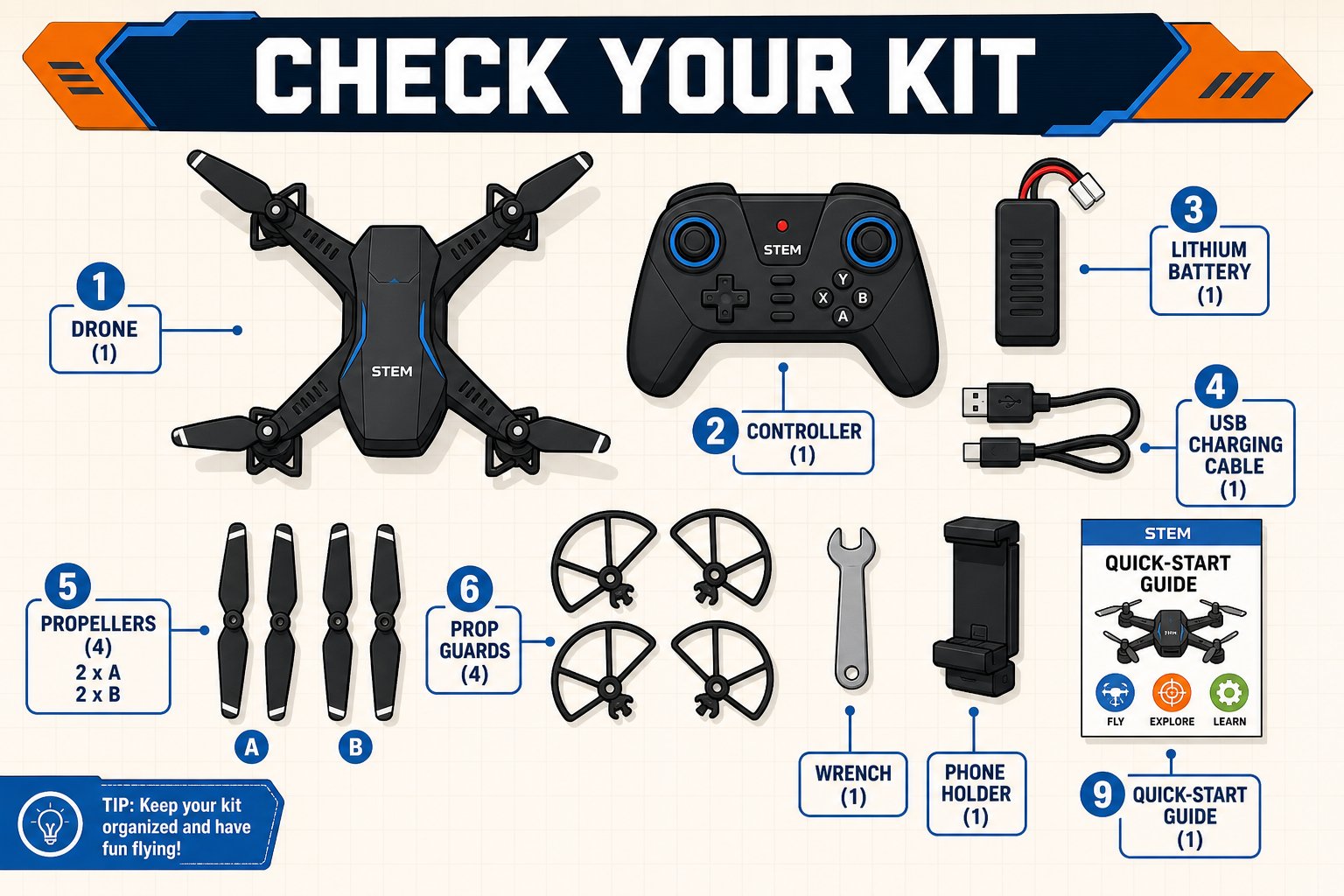 Open your box and confirm you have every part. Some pieces may be tucked under the drone tray.
| Part | Quantity |
| ------------------------------ | --------------------------- |
| Drone | 1 |
| Controller | 1 |
| Drone battery | 1 |
| USB charger cable | 1 |
| Propellers | 4 (two A, two B) |
| Prop guards | 4 |
| Wrench (to remove propellers) | 1 |
| Phone holder | 1 |
| Quick-start guide | 1 |
| AAA batteries (for controller) | Not included - have 2 ready |
## Propellers: A and B matter
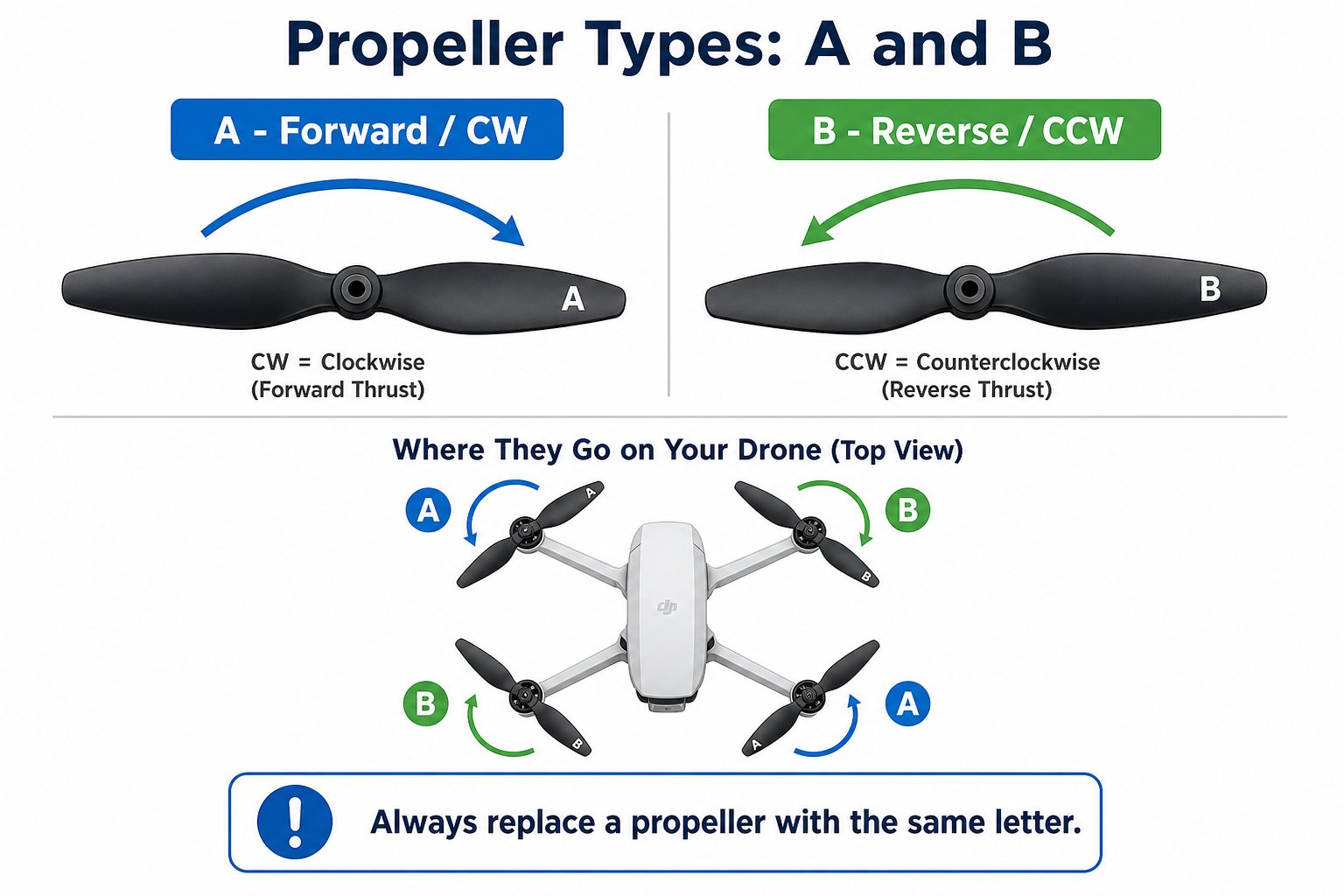
Each propeller has a small **A** or **B** printed on its blade. They spin in opposite directions and are **not interchangeable**. Putting one in the wrong place makes the drone flip or refuse to take off.
Open your box and confirm you have every part. Some pieces may be tucked under the drone tray.
| Part | Quantity |
| ------------------------------ | --------------------------- |
| Drone | 1 |
| Controller | 1 |
| Drone battery | 1 |
| USB charger cable | 1 |
| Propellers | 4 (two A, two B) |
| Prop guards | 4 |
| Wrench (to remove propellers) | 1 |
| Phone holder | 1 |
| Quick-start guide | 1 |
| AAA batteries (for controller) | Not included - have 2 ready |
## Propellers: A and B matter
Each propeller has a small **A** or **B** printed on its blade. They spin in opposite directions and are **not interchangeable**. Putting one in the wrong place makes the drone flip or refuse to take off.
 ### The placement map
Look down at your drone from above. The **A** propellers go on one diagonal pair, and the **B** propellers on the other - always alternating around the drone.
### The placement map
Look down at your drone from above. The **A** propellers go on one diagonal pair, and the **B** propellers on the other - always alternating around the drone.
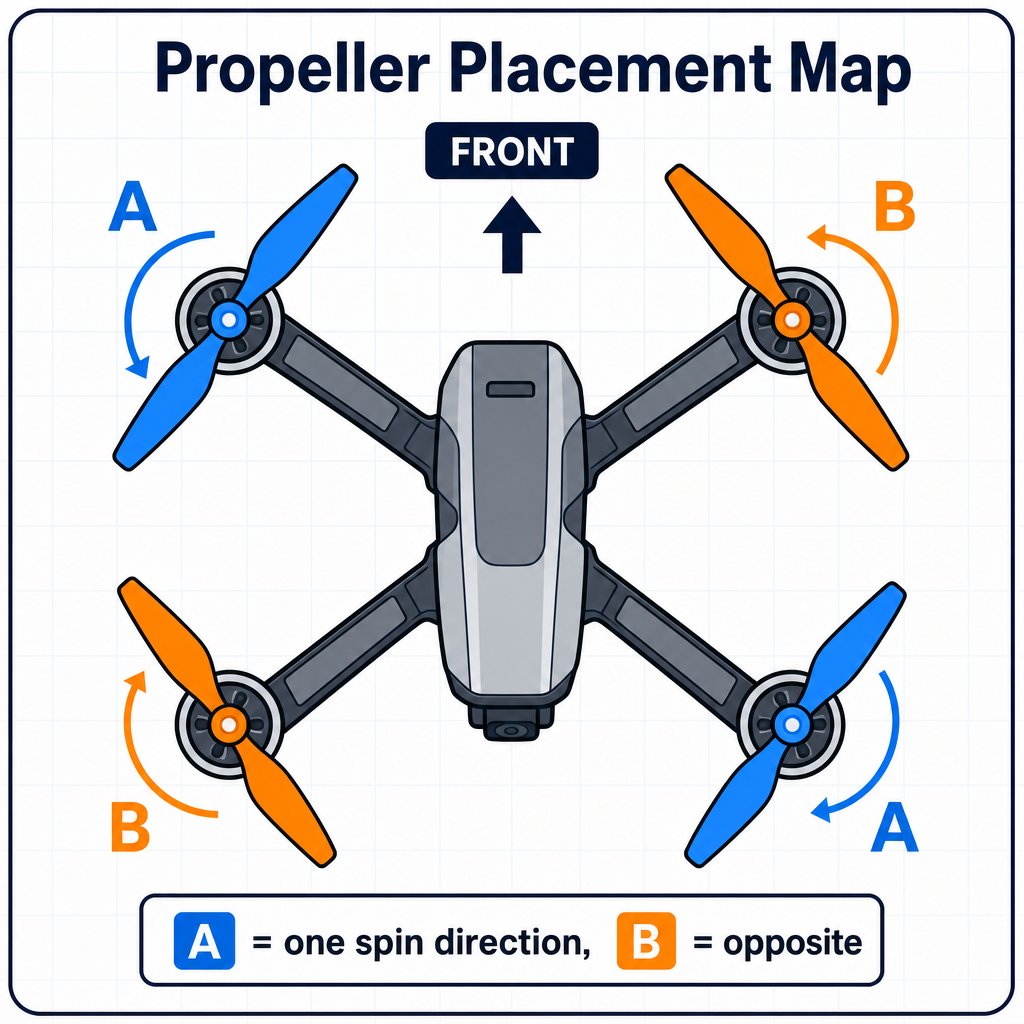 The #1 reason a freshly built drone won't take off is a propeller in the wrong spot. If your drone flips, wobbles, or refuses to lift, **check the A/B placement first**.
## Build steps
Clip each circular prop guard onto its arm around the motor. Press until it clicks into place. These protect the blades, your fingers, and your walls.
Match each propeller's **A** or **B** to the correct motor position (use the placement map above). Press each one firmly onto its motor shaft. Double-check every letter before flying.
Slide the charged lithium battery into the drone's body until it clicks. It only fits one way - don't force it.
Put two fresh **AAA batteries** in the back of the controller.
Switch the drone's power on and press and hold the controller's On/Off button. You'll pair them on Day 2 - for now just confirm both power up (lights come on).
Never spin up the motors while handling the drone or with the propellers near your face. Set the drone on a flat surface, hands clear, before it ever powers its motors.
## Removing a propeller
If you ever need to swap a propeller, use the included **wrench** to grip and pull it straight off the motor shaft. When replacing, always use a new propeller with the **same letter** (A or B).
For prop guards, if you need to remove one, don't yank it straight down - tip or push in the part attached to the motor and it pops right off.
## Common build mistakes
Almost always an A/B propeller in the wrong position. Recheck against the placement map.
It wasn't pressed all the way onto the motor shaft. Power off and press firmly until seated.
It only fits one way - don't force it. Flip it and try again gently.
Check the drone battery is charged and clicked in, and that the controller has fresh AAA batteries.
All four propellers are installed in the correct A/B positions, the prop guards are clipped on, the battery is seated, and both the drone and controller power on.
The #1 reason a freshly built drone won't take off is a propeller in the wrong spot. If your drone flips, wobbles, or refuses to lift, **check the A/B placement first**.
## Build steps
Clip each circular prop guard onto its arm around the motor. Press until it clicks into place. These protect the blades, your fingers, and your walls.
Match each propeller's **A** or **B** to the correct motor position (use the placement map above). Press each one firmly onto its motor shaft. Double-check every letter before flying.
Slide the charged lithium battery into the drone's body until it clicks. It only fits one way - don't force it.
Put two fresh **AAA batteries** in the back of the controller.
Switch the drone's power on and press and hold the controller's On/Off button. You'll pair them on Day 2 - for now just confirm both power up (lights come on).
Never spin up the motors while handling the drone or with the propellers near your face. Set the drone on a flat surface, hands clear, before it ever powers its motors.
## Removing a propeller
If you ever need to swap a propeller, use the included **wrench** to grip and pull it straight off the motor shaft. When replacing, always use a new propeller with the **same letter** (A or B).
For prop guards, if you need to remove one, don't yank it straight down - tip or push in the part attached to the motor and it pops right off.
## Common build mistakes
Almost always an A/B propeller in the wrong position. Recheck against the placement map.
It wasn't pressed all the way onto the motor shaft. Power off and press firmly until seated.
It only fits one way - don't force it. Flip it and try again gently.
Check the drone battery is charged and clicked in, and that the controller has fresh AAA batteries.
All four propellers are installed in the correct A/B positions, the prop guards are clipped on, the battery is seated, and both the drone and controller power on.