> ## Documentation Index
> Fetch the complete documentation index at: https://stem-docs.intellectualpoint.com/llms.txt
> Use this file to discover all available pages before exploring further.
# How drones fly
> Master the physics of flight - the four forces, how propellers make lift, and how four motors create every movement.
## The physics of staying up
A drone flying looks like magic, but it's pure physics. Everything a drone does comes down to balancing **four forces** and controlling **four spinning motors**. Understand these and you understand every flight command you'll ever give - by hand or by code.
## The four forces of flight
Every flying thing - a bird, a jet, your drone - is pushed and pulled by the same four forces.
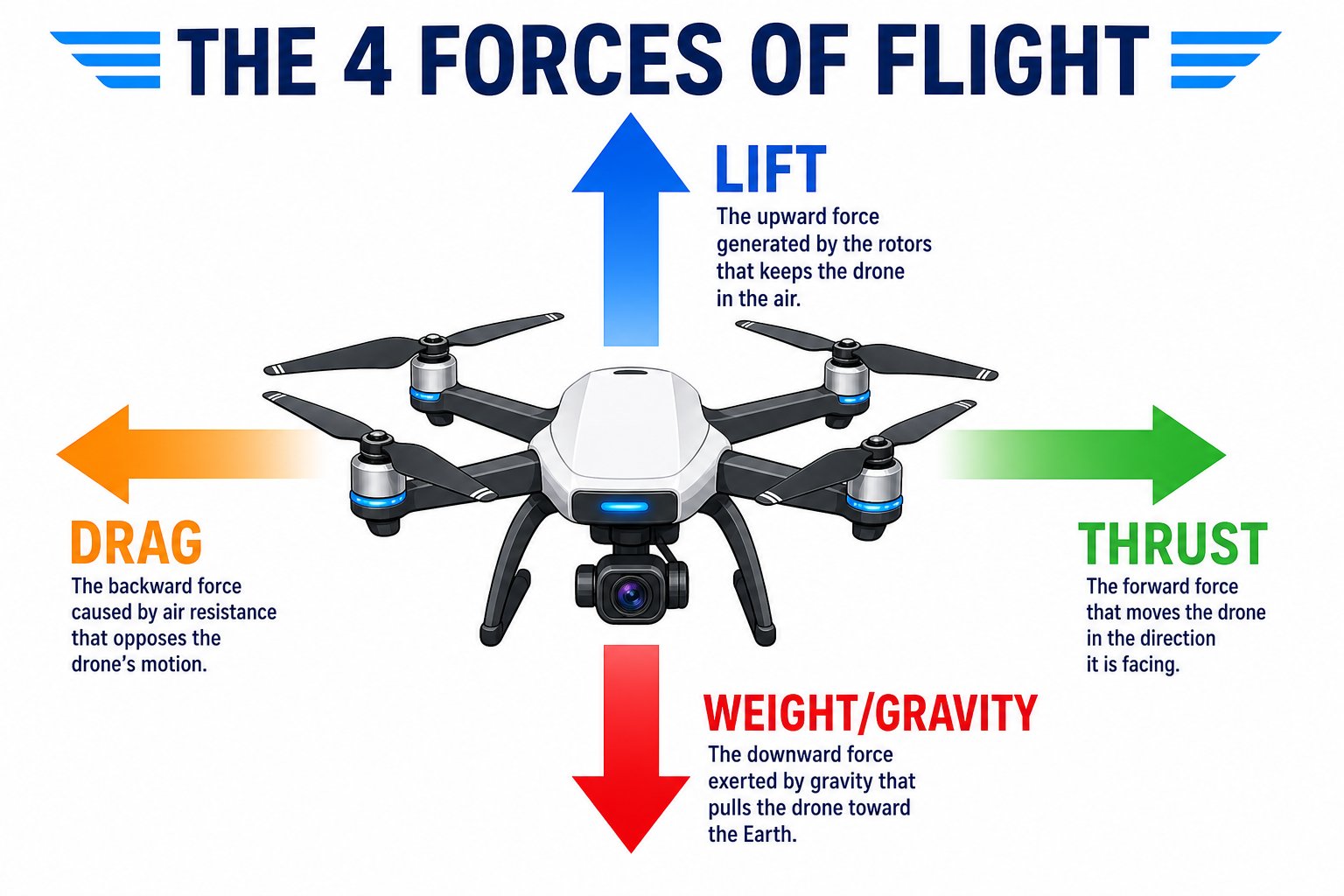 | Force | Direction | What it does |
| ---------- | --------- | ------------------------------------------------------ |
| **Lift** | Up | Created by the spinning propellers; holds the drone up |
| **Weight** | Down | Gravity pulling the drone toward the ground |
| **Thrust** | Forward | Pushes the drone in the direction it leans |
| **Drag** | Backward | Air resistance that slows the drone down |
To **hover**, lift exactly equals weight. To **climb**, lift beats weight. To **move**, the drone tilts so some thrust points sideways.
## Hover, climb, or descend
The whole game of altitude is a tug-of-war between **lift** (up) and **weight** (down). Change how hard the motors push and you change which force wins.
| Force | Direction | What it does |
| ---------- | --------- | ------------------------------------------------------ |
| **Lift** | Up | Created by the spinning propellers; holds the drone up |
| **Weight** | Down | Gravity pulling the drone toward the ground |
| **Thrust** | Forward | Pushes the drone in the direction it leans |
| **Drag** | Backward | Air resistance that slows the drone down |
To **hover**, lift exactly equals weight. To **climb**, lift beats weight. To **move**, the drone tilts so some thrust points sideways.
## Hover, climb, or descend
The whole game of altitude is a tug-of-war between **lift** (up) and **weight** (down). Change how hard the motors push and you change which force wins.
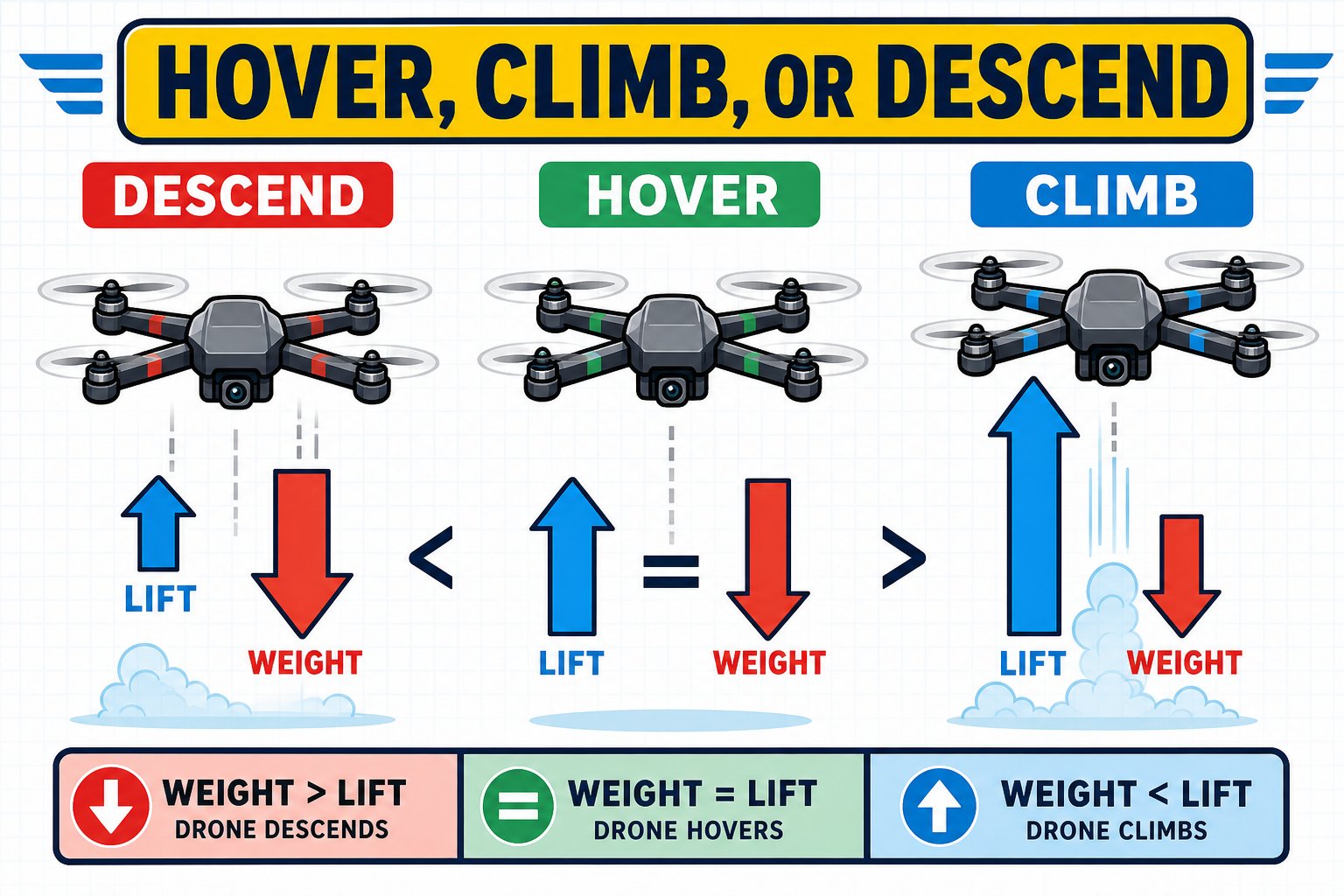 Motors ease off, gravity wins, the drone **descends**.
Perfectly balanced - the drone **hovers** in place.
Motors speed up, lift wins, the drone **climbs**.
## How a propeller makes lift
A propeller is really a spinning wing. Each blade is shaped as an **airfoil**, and as it slices through the air it throws air **downward**. By Newton's third law - every action has an equal and opposite reaction - throwing air down pushes the drone **up**.
Motors ease off, gravity wins, the drone **descends**.
Perfectly balanced - the drone **hovers** in place.
Motors speed up, lift wins, the drone **climbs**.
## How a propeller makes lift
A propeller is really a spinning wing. Each blade is shaped as an **airfoil**, and as it slices through the air it throws air **downward**. By Newton's third law - every action has an equal and opposite reaction - throwing air down pushes the drone **up**.
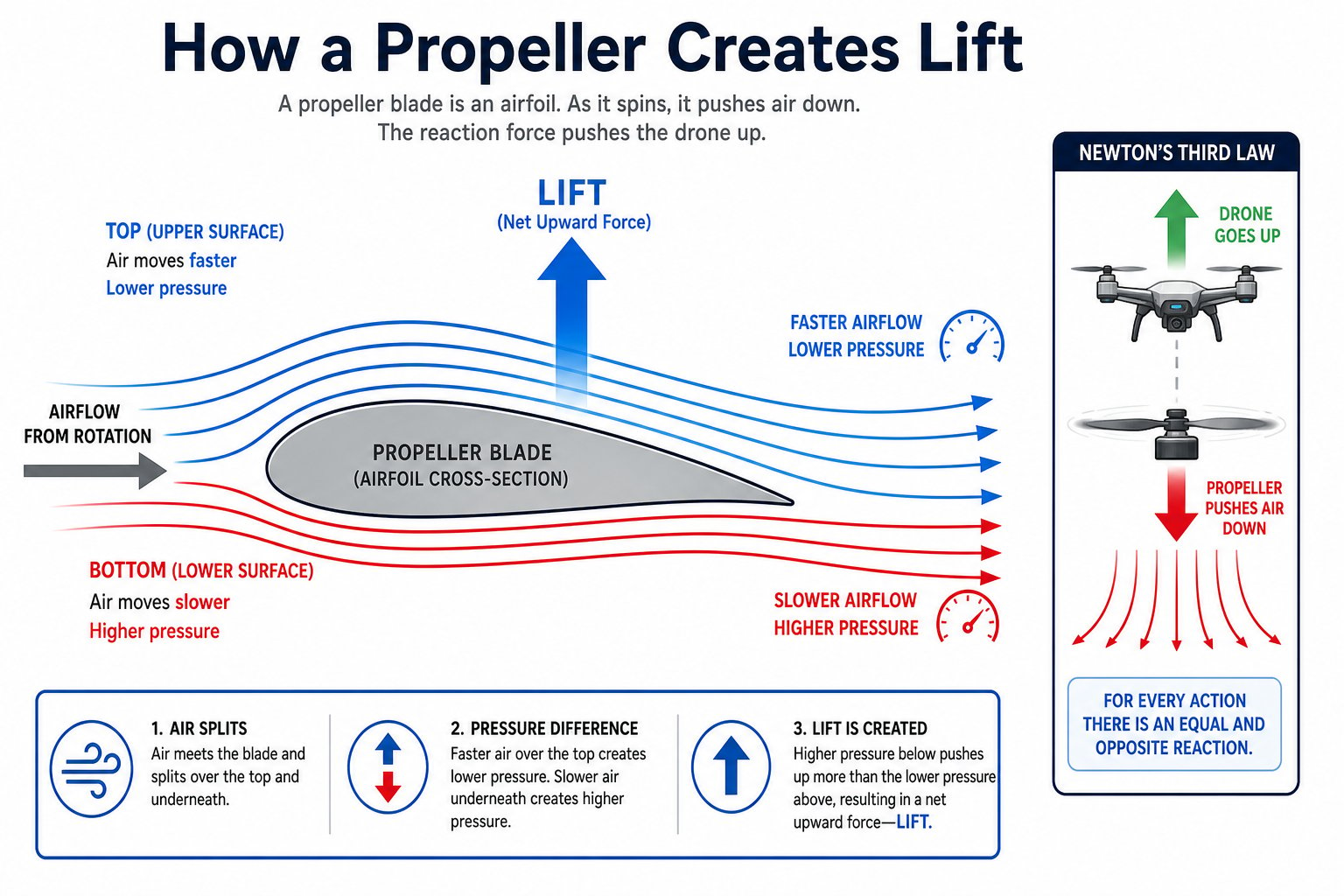 Spin the propellers faster and they throw more air down, creating more lift. This is the drone's throttle: more motor speed means more lift means the drone rises.
## Four motors, total control
Here's the clever part. A quadcopter has no flaps or rudders - it steers purely by changing the speed of its four motors. Two spin clockwise and two counterclockwise, in an alternating pattern.
Spin the propellers faster and they throw more air down, creating more lift. This is the drone's throttle: more motor speed means more lift means the drone rises.
## Four motors, total control
Here's the clever part. A quadcopter has no flaps or rudders - it steers purely by changing the speed of its four motors. Two spin clockwise and two counterclockwise, in an alternating pattern.
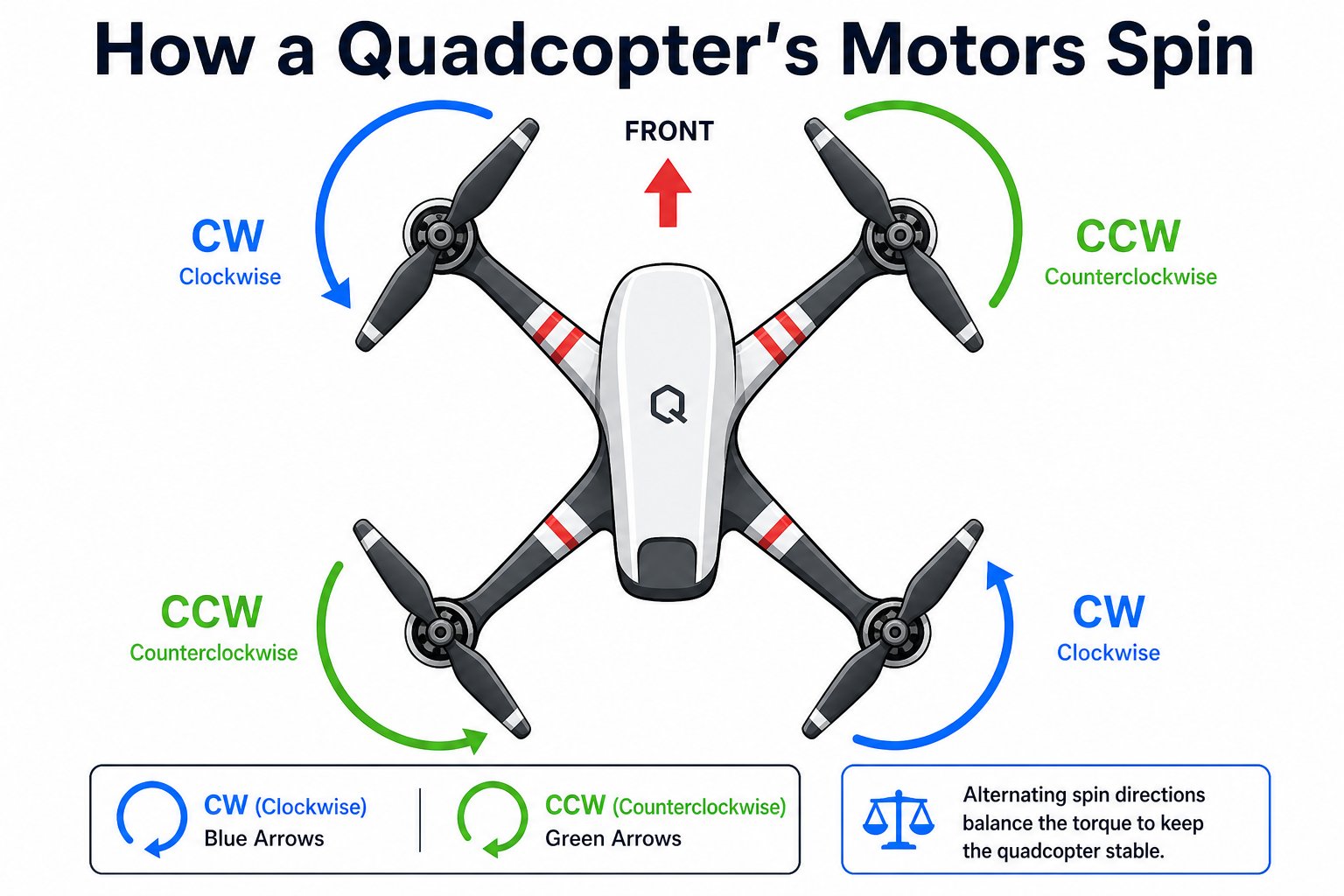 If all four motors spun the same direction, the whole drone body would spin the opposite way (like a helicopter with no tail rotor). Alternating the directions cancels this out - which is why propeller placement matters.
## From motor speed to movement
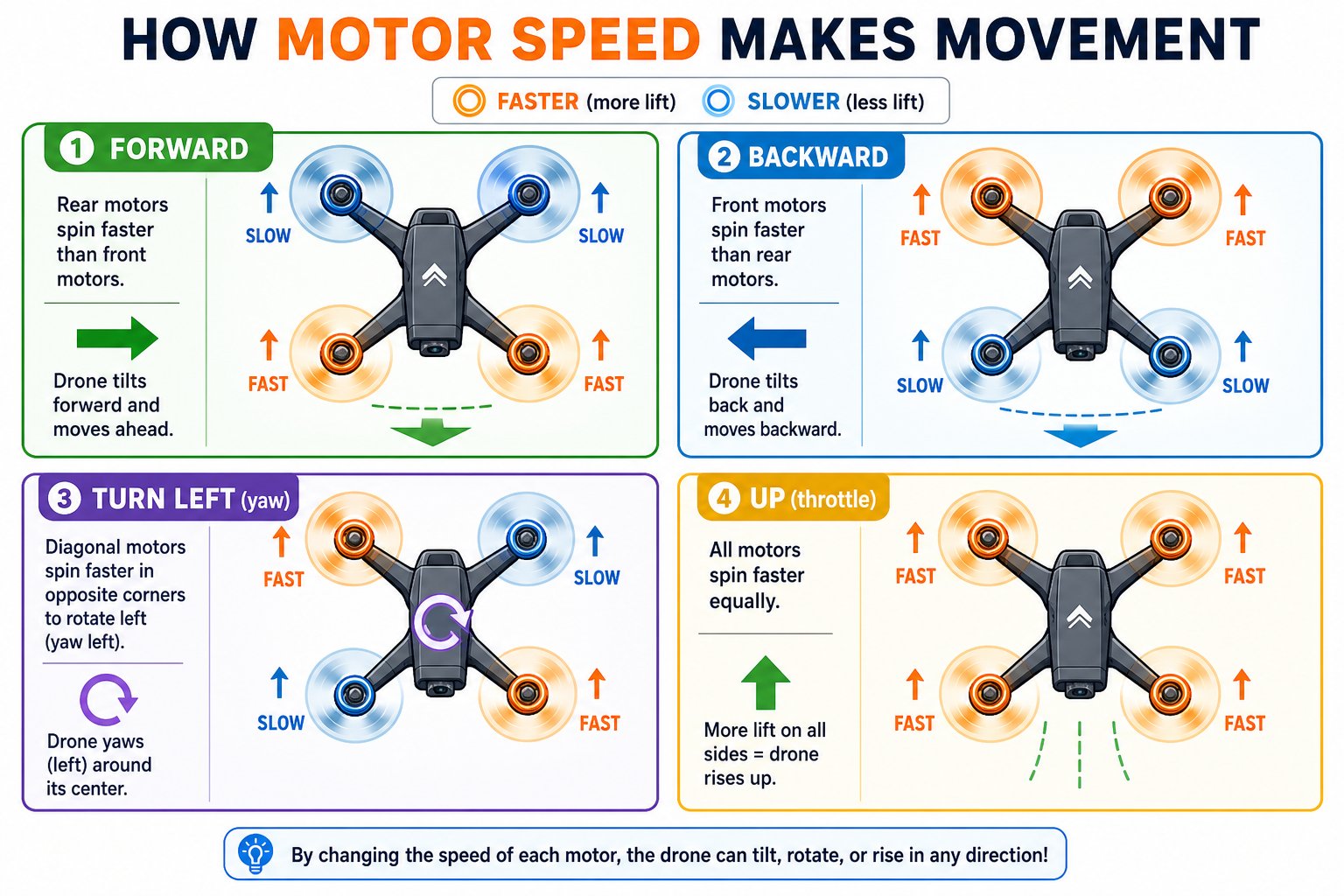
So how does changing four motor speeds turn into "go forward" or "spin left"? By speeding up some motors and slowing others, the drone **tilts** in the direction you want to go, or **twists** to face a new way.
If all four motors spun the same direction, the whole drone body would spin the opposite way (like a helicopter with no tail rotor). Alternating the directions cancels this out - which is why propeller placement matters.
## From motor speed to movement
So how does changing four motor speeds turn into "go forward" or "spin left"? By speeding up some motors and slowing others, the drone **tilts** in the direction you want to go, or **twists** to face a new way.
 ## The three ways a drone moves
Pilots describe drone motion as **roll, pitch, and yaw** - three ways to rotate around three axes.
## The three ways a drone moves
Pilots describe drone motion as **roll, pitch, and yaw** - three ways to rotate around three axes.
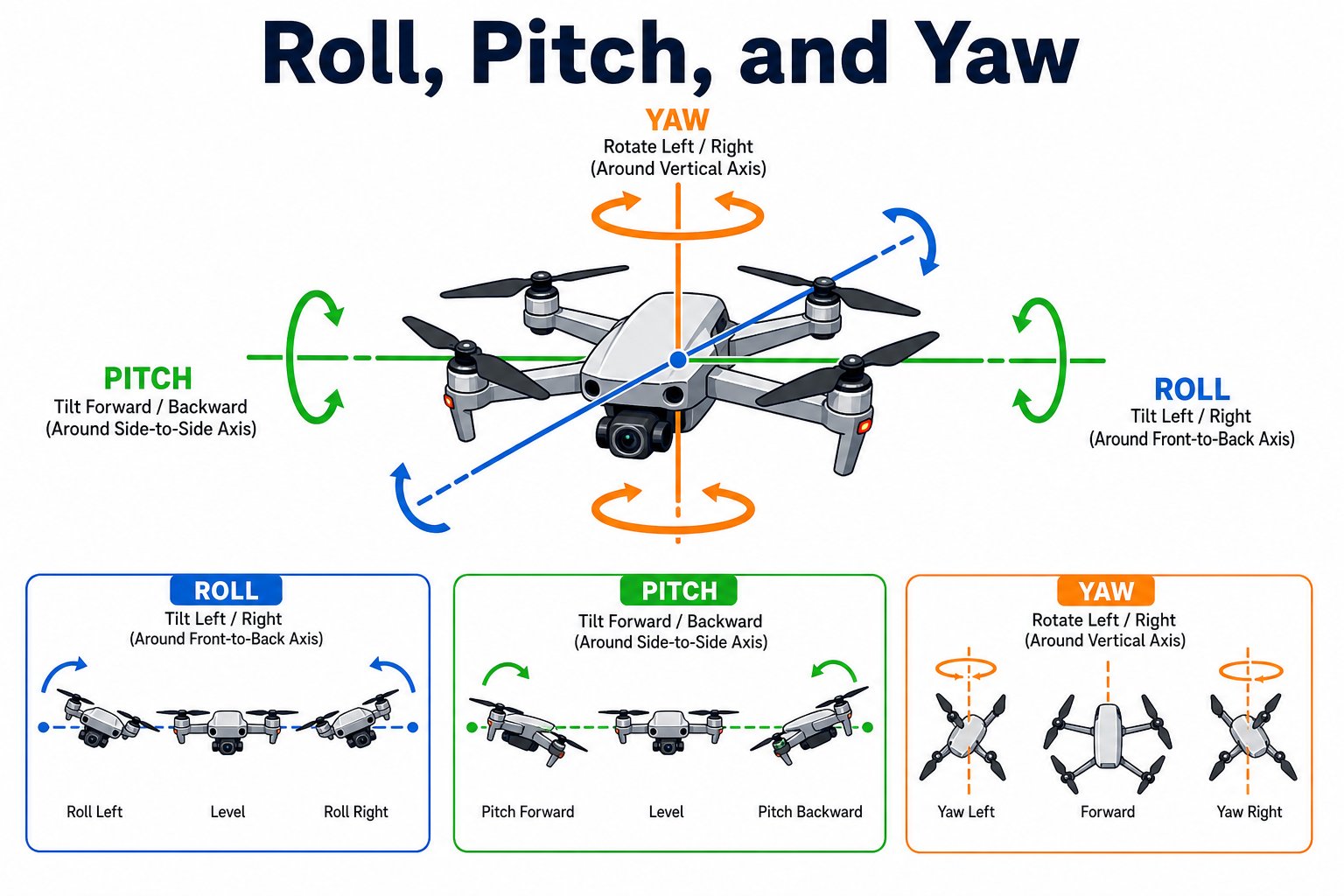 Tilts left or right, so the drone slides sideways.
Tilts forward or backward, so the drone flies forward or back.
Spins the drone left or right to face a new direction, without moving.
Add a fourth control - **throttle** (all motors faster or slower for up and down) - and you have the four inputs behind every flight, whether you push a joystick or send a command from your code.
## The four inputs behind every flight
| Input | What it changes | On the controller | In your code |
| ------------ | ------------------ | ---------------------- | -------------------------------- |
| **Throttle** | Up / down | Left stick up/down | `take off`, `vertical move up` |
| **Yaw** | Turn left / right | Left stick left/right | `turn`, `rotate` |
| **Pitch** | Forward / back | Right stick up/down | `fly forward`, `horizontal move` |
| **Roll** | Slide left / right | Right stick left/right | `fly left` / `right` |
Every command you write on Day 3 sets one of just four values: **roll, pitch, yaw, and throttle**. Learn them now and the code will make instant sense later.
## Try this thought experiment
If the drone drifts sideways while hovering, which force is slightly unbalanced - and how could the flight controller fix it?
If you taped a coin to your drone, what would the motors have to do to still hover? What happens to flight time?
You can name the four forces of flight, explain how a propeller makes lift, describe roll, pitch, and yaw, and connect each to throttle and the two sticks.
Tilts left or right, so the drone slides sideways.
Tilts forward or backward, so the drone flies forward or back.
Spins the drone left or right to face a new direction, without moving.
Add a fourth control - **throttle** (all motors faster or slower for up and down) - and you have the four inputs behind every flight, whether you push a joystick or send a command from your code.
## The four inputs behind every flight
| Input | What it changes | On the controller | In your code |
| ------------ | ------------------ | ---------------------- | -------------------------------- |
| **Throttle** | Up / down | Left stick up/down | `take off`, `vertical move up` |
| **Yaw** | Turn left / right | Left stick left/right | `turn`, `rotate` |
| **Pitch** | Forward / back | Right stick up/down | `fly forward`, `horizontal move` |
| **Roll** | Slide left / right | Right stick left/right | `fly left` / `right` |
Every command you write on Day 3 sets one of just four values: **roll, pitch, yaw, and throttle**. Learn them now and the code will make instant sense later.
## Try this thought experiment
If the drone drifts sideways while hovering, which force is slightly unbalanced - and how could the flight controller fix it?
If you taped a coin to your drone, what would the motors have to do to still hover? What happens to flight time?
You can name the four forces of flight, explain how a propeller makes lift, describe roll, pitch, and yaw, and connect each to throttle and the two sticks.