> ## Documentation Index
> Fetch the complete documentation index at: https://stem-docs.intellectualpoint.com/llms.txt
> Use this file to discover all available pages before exploring further.
# Incident response
> Learn the PICERL framework - the six phases every security team follows when responding to a cyberattack.
## When things go wrong
No matter how strong your defenses are, breaches happen. Firewalls get bypassed. Employees click phishing links. Zero-day exploits appear without warning. The question is never *if* your organization will face a security incident - it is *when*.
**Incident response (IR)** is the organized approach an organization uses to detect, contain, and recover from cybersecurity incidents. A well-prepared team with a tested plan can mean the difference between a minor disruption and a catastrophe that shuts down the entire business.
Every major organization - from Fortune 500 companies to government agencies - has an incident response plan. Many are required by law to have one. Without a plan, teams panic, make mistakes, and let incidents spiral out of control.
 ***
## Events, alerts, and incidents
Before you can respond to an incident, you need to understand what qualifies as one. Not every suspicious event is an emergency.
| Term | Definition | Example |
| ------------ | ----------------------------------------------------------------- | ------------------------------------------------------------------ |
| **Event** | Any observable occurrence in a system or network | A user logs in at 10 AM |
| **Alert** | An event that a security tool flags as potentially suspicious | A user logs in from two countries within five minutes |
| **Incident** | A confirmed violation of security policy that requires a response | An attacker uses stolen credentials to access the payroll database |
Think of it as a funnel. Your systems generate **millions** of events every day. Security tools filter those into a much smaller number of **alerts**. Security analysts investigate alerts and determine which ones are real **incidents** that require a coordinated response.
Not every alert is an incident. Part of a security analyst's job is separating real threats from false positives. If every alert triggered a full response, your team would burn out in a week.
***
## The PICERL framework
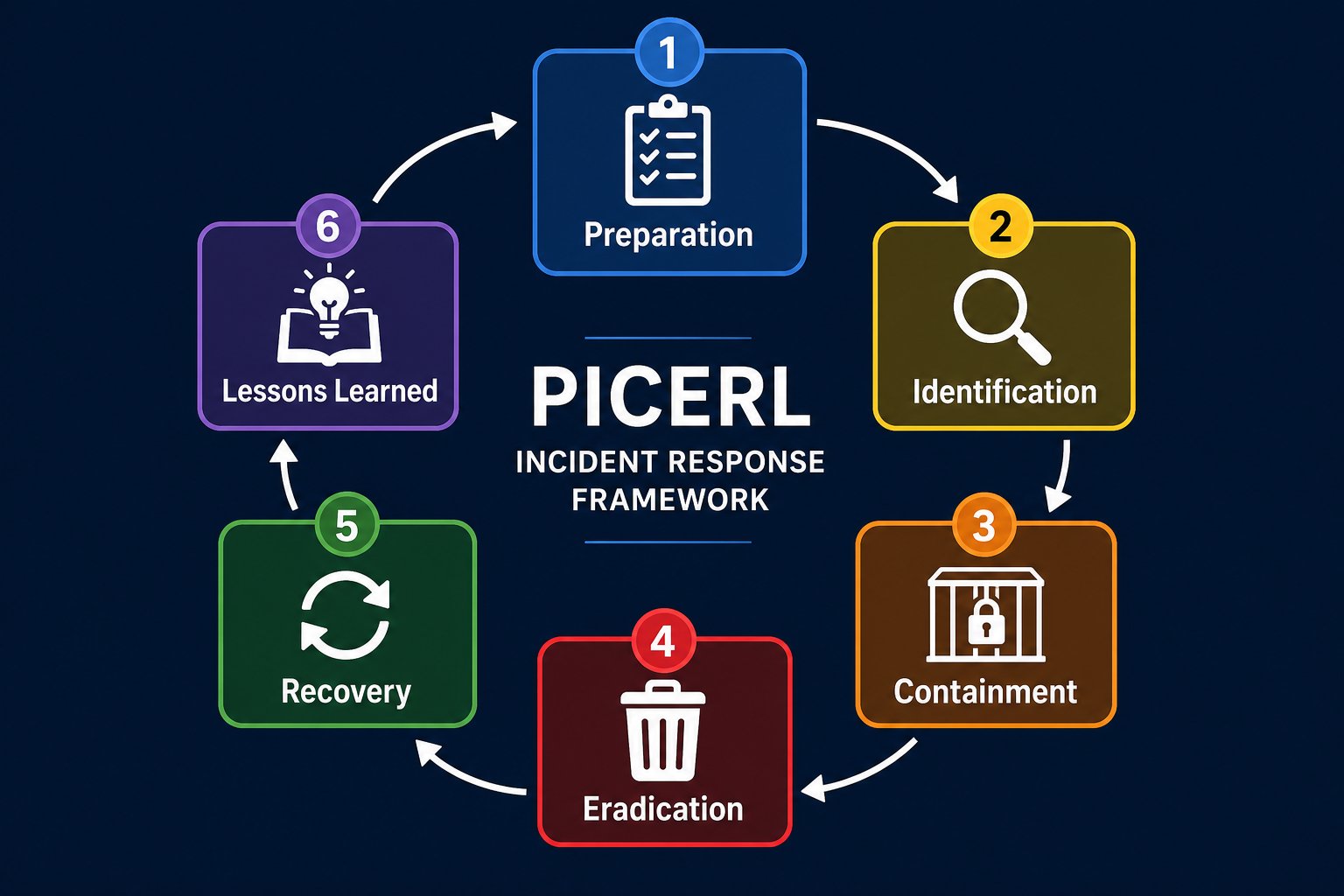
PICERL is the industry-standard incident response framework. It defines six phases that every response team follows, in order, when handling a security incident.
The name comes from the first letter of each phase: **P**reparation, **I**dentification, **C**ontainment, **E**radication, **R**ecovery, **L**essons Learned.
Build your team, create your plan, and practice before an incident happens.
Detect that something is wrong and determine the scope of the incident.
Stop the incident from spreading to other systems.
Remove the threat completely from your environment.
Restore systems to normal operations and monitor for re-infection.
Analyze what happened, what worked, and what you need to improve.
Let's go deep on each phase.
***
### Phase 1: Preparation
***
## Events, alerts, and incidents
Before you can respond to an incident, you need to understand what qualifies as one. Not every suspicious event is an emergency.
| Term | Definition | Example |
| ------------ | ----------------------------------------------------------------- | ------------------------------------------------------------------ |
| **Event** | Any observable occurrence in a system or network | A user logs in at 10 AM |
| **Alert** | An event that a security tool flags as potentially suspicious | A user logs in from two countries within five minutes |
| **Incident** | A confirmed violation of security policy that requires a response | An attacker uses stolen credentials to access the payroll database |
Think of it as a funnel. Your systems generate **millions** of events every day. Security tools filter those into a much smaller number of **alerts**. Security analysts investigate alerts and determine which ones are real **incidents** that require a coordinated response.
Not every alert is an incident. Part of a security analyst's job is separating real threats from false positives. If every alert triggered a full response, your team would burn out in a week.
***
## The PICERL framework
PICERL is the industry-standard incident response framework. It defines six phases that every response team follows, in order, when handling a security incident.
The name comes from the first letter of each phase: **P**reparation, **I**dentification, **C**ontainment, **E**radication, **R**ecovery, **L**essons Learned.
Build your team, create your plan, and practice before an incident happens.
Detect that something is wrong and determine the scope of the incident.
Stop the incident from spreading to other systems.
Remove the threat completely from your environment.
Restore systems to normal operations and monitor for re-infection.
Analyze what happened, what worked, and what you need to improve.
Let's go deep on each phase.
***
### Phase 1: Preparation
 Preparation is the most important phase - and it happens **before** any incident occurs. A good company should always be in the planning and preparation phase. Incident response is an ongoing, never-ending process, not something you build once and forget.
#### Build the incident response team (IRT)
Every organization needs a dedicated group of people who know exactly what to do when an incident hits. The IRT typically includes:
| Role | Responsibility |
| ------------------------- | -------------------------------------------------------------------- |
| **IR Manager** | Leads the response, makes final decisions, coordinates communication |
| **Security Analysts** | Investigate the incident, analyze logs, identify the threat |
| **Forensics Specialists** | Collect and preserve digital evidence |
| **IT Operations** | Isolate systems, restore services, apply patches |
| **Legal Counsel** | Advise on regulatory obligations, evidence handling, liability |
| **Communications Lead** | Handle internal and external messaging (employees, customers, media) |
| **Executive Sponsor** | Senior leader who authorizes budget and major decisions |
#### Define your communication plan
When an incident hits, everyone needs to know who to call and how. Your communication plan should answer:
* Who gets notified first?
* What communication channels are used? (Phone? Slack? In-person only?)
* When do you escalate to executives? To legal? To law enforcement?
* Who talks to the media?
During an incident, **never** use potentially compromised communication channels. If your email server is breached, don't send incident updates over email. Use out-of-band communication - phone calls, personal devices, or pre-established backup channels.
#### Create playbooks
A **playbook** is a step-by-step guide for responding to a specific type of incident. You don't want your team improvising during a crisis - you want them following a tested plan.
Common playbooks include:
* Ransomware response
* Phishing email investigation
* Insider threat detection
* Distributed denial-of-service (DDoS) mitigation
* Data breach notification
#### Set up tools
Your team needs the right technology in place before day one:
* **SIEM (Security Information and Event Management):** Collects and correlates logs from across your network
* **IDS/IPS (Intrusion Detection/Prevention Systems):** Monitor for suspicious activity
* **Forensic tools:** Software for creating disk images, analyzing malware, and preserving evidence
* **Ticketing system:** Track incidents from detection through resolution
* **Backup systems:** Verified, tested, and ready to restore
#### Practice
Plans on paper are not enough. You need to practice.
* **Tabletop exercises (TTX):** Discussion-based walkthroughs where your team talks through a scenario step by step. No actual systems are involved - just brains and whiteboards.
* **Simulations:** Hands-on exercises using actual tools and realistic attack data. These test both your plan and your people under pressure.
The Donuts & Dragons wargame you are doing this week is essentially a tabletop exercise. You are walking through attack scenarios, discussing how your defenses respond, and identifying gaps - exactly what professional security teams do.
***
### Phase 2: Identification
Identification is where you detect that an incident has occurred and figure out what you are dealing with.
#### Detection sources
Incidents can be discovered through many channels:
* **SIEM alerts:** Automated correlation of log data triggers a warning
* **IDS/IPS notifications:** Network or host-based sensors detect suspicious traffic or behavior
* **User reports:** An employee notices something strange - "My computer is running slowly" or "I got a weird email from the CEO"
* **Log anomalies:** A security analyst reviewing logs spots an unusual pattern
* **External notification:** A partner, law enforcement agency, or even the attacker themselves notifies you
* **Threat intelligence feeds:** Indicators of compromise (IOCs) matching your environment
#### Determine scope
Once you suspect an incident, you need to quickly answer:
* **What systems are affected?** Is it one workstation, a server, or the entire network?
* **What data is at risk?** Customer records? Financial data? Intellectual property?
* **How long has this been going on?** Was the attacker in your network for hours or months?
* **Is the incident still active?** Is the attacker still inside right now?
From this moment forward, **document everything**. Every action taken, every system examined, every decision made. This documentation becomes critical during forensics, legal proceedings, and the lessons learned phase.
***
### Phase 3: Containment
Now that you know what you are dealing with, your immediate priority is to stop it from getting worse. Containment prevents the incident from spreading to additional systems.
#### Short-term containment
These are your emergency, right-now actions:
* Isolate affected systems from the network (unplug the cable, disable the Wi-Fi adapter)
* Disable compromised user accounts
* Block malicious IP addresses at the firewall
* Redirect DNS to prevent communication with command-and-control servers
The goal is speed - stop the bleeding before you worry about surgery.
#### Long-term containment
Once the immediate spread is stopped, you implement more durable containment measures:
* Patch the vulnerability the attacker exploited
* Strengthen access controls
* Deploy additional monitoring on affected segments
* Set up a clean staging environment for rebuilding systems
**Preserve evidence.** Do not wipe, reformat, or rebuild compromised systems yet. You need them intact for forensic analysis. Take forensic images before making any changes.
***
### Phase 4: Eradication
With the incident contained, you now remove every trace of the threat from your environment.
Eradication actions include:
* **Delete malware** from all affected systems
* **Close backdoors** the attacker installed for persistent access
* **Patch vulnerabilities** that allowed the initial breach
* **Rebuild compromised systems** from known-clean images (do not trust a system that was compromised - rebuild it from scratch)
* **Reset credentials** for any accounts that may have been compromised
* **Scan again** - verify the threat is truly gone by running thorough scans across your environment
Attackers frequently install multiple backdoors. If you find one, assume there are others. A partial cleanup leaves your door wide open for a return visit.
***
### Phase 5: Recovery
Recovery is the process of returning your organization to normal operations. This phase requires patience - you don't flip everything back on at once.
Use verified, uncompromised backups to restore data and systems. Never restore from a backup that may contain the attacker's malware.
Bring systems back online one at a time. Validate each system before reconnecting it to the production network.
Watch restored systems intensely for any signs of re-infection. Increase logging and alerting thresholds during this period.
Start with non-critical systems and work your way up. Full production operations resume only after you are confident the environment is clean.
This is where backups prove their worth. An organization with tested, offline backups can recover from ransomware in hours. An organization without backups may be looking at weeks of downtime - or paying the ransom.
***
### Phase 6: Lessons learned
This is the phase most organizations skip - and it is the one that matters most for preventing the next incident.
Within 1-2 weeks of closing the incident, gather your entire response team for a **post-incident review**. Walk through the complete timeline and answer:
* **What happened?** Build a detailed timeline from initial compromise to full recovery.
* **How did the attacker get in?** Identify the root cause, not just the symptoms.
* **What went well?** Which parts of your plan worked? Which team members stepped up?
* **What failed?** Where did the plan break down? What took too long? What was missing?
* **What needs to change?** Update your playbooks, tools, training, and staffing based on what you learned.
This information gets documented in two formal deliverables (covered in the next section).
The lessons learned phase is what makes incident response a **cycle**, not a one-time event. Every incident teaches you something. The best security teams use every incident - even small ones - to continuously improve their preparation.
***
## Post-incident reporting
After the dust settles, you need to formally document what happened. These reports serve multiple audiences: technical teams, executives, legal counsel, regulators, and insurance providers.
The IRR is the formal, comprehensive record of the entire incident. It documents what happened, what actions were taken, and the outcomes.
A typical IRR includes:
| Section | Contents |
| ------------------ | ----------------------------------------------------------------- |
| Executive summary | One-page overview for leadership |
| Incident timeline | Chronological record of every event and response action |
| Systems affected | List of compromised or impacted systems and data |
| Response actions | What containment, eradication, and recovery steps were taken |
| Evidence collected | Forensic images, logs, malware samples, screenshots |
| Impact assessment | Business impact - financial loss, data exposed, downtime duration |
| Recommendations | Changes to prevent recurrence |
The IRR becomes part of the organization's permanent records and may be requested by auditors, regulators, or courts.
The RCA digs deeper than the IRR. It identifies the **fundamental cause** of the incident - not just the immediate trigger, but the underlying weakness that allowed it to happen.
For example:
* **Immediate cause:** An employee clicked a phishing link
* **Root cause:** The organization had no security awareness training program, no email filtering, and no multi-factor authentication
A strong RCA answers "why" multiple times until you reach the systemic issue. This is sometimes called the **5 Whys** technique:
1. *Why was the data stolen?* → The attacker accessed the database.
2. *Why could the attacker access the database?* → They had valid credentials.
3. *Why did they have valid credentials?* → An employee's password was compromised.
4. *Why was the password compromised?* → The employee entered it on a phishing page.
5. *Why did the employee fall for phishing?* → There was no security awareness training.
Root cause: **Lack of security awareness training and phishing defenses.**
Executives don't need technical deep-dives. They need a clear, concise summary that answers:
* What happened (in plain language)?
* What is the business impact (financial loss, customers affected, regulatory exposure)?
* What are you doing to prevent it from happening again?
* What resources do you need (budget, staffing, tools)?
This report is typically 1-2 pages and focuses on **risk and business impact**, not technical details.
***
## Training types
Your incident response plan is only as good as the people executing it. Training ensures your team can perform under pressure.
Tabletop exercises are **discussion-based** practice sessions. Your team gathers around a table (or a video call) and walks through a hypothetical scenario step by step.
**How it works:**
1. A facilitator presents a scenario (e.g., "You discover ransomware on five workstations")
2. The team discusses what they would do at each stage
3. The facilitator introduces complications ("The backup server is also encrypted")
4. The team adapts their response
5. Everyone debriefs on what went well and what didn't
**Pros:** Low cost, no disruption to operations, great for testing communication and decision-making.
**Cons:** No hands-on practice with actual tools, may not reveal technical gaps.
Simulations are **hands-on** exercises using actual tools and realistic data. They test both your plan and your team's technical ability to execute it.
**How it works:**
1. An isolated lab environment is set up with realistic systems
2. An attack is simulated (sometimes by a dedicated Red Team)
3. The response team must detect, contain, eradicate, and recover - for real
4. Results are measured: detection time, containment time, recovery time
5. Full debrief follows
**Pros:** Tests real skills, reveals technical gaps, builds muscle memory.
**Cons:** Expensive, time-consuming, requires dedicated infrastructure.
What you are doing this week is essentially a **tabletop exercise**. You are:
* Walking through realistic attack scenarios
* Discussing how your purchased defenses respond
* Documenting your response actions
* Debriefing on what worked and what didn't
The only difference from a professional TTX is scale. Real-world exercises might involve hundreds of participants across multiple departments. Yours involves your team defending a donut shop - but the principles are identical.
***
## Exercise: write an incident report
Put what you have learned into practice. Read the scenario below, then write a brief incident report.
**The situation:** On Tuesday at 9:47 AM, a barista at Donuts & Dragons received an email that appeared to be from the POS vendor. The email said there was a critical update available and included a link to download it. The barista clicked the link and entered their work credentials on a page that looked identical to the vendor's login portal. By 10:15 AM, the attacker used the stolen credentials to access the POS system remotely and began exporting customer payment data.
At 11:30 AM, the security monitoring service flagged unusual outbound data transfers from the POS system. The team was notified at 11:45 AM.
**Your task:** Write a brief incident report that includes:
1. **Timeline** of key events
2. **Systems affected** and data at risk
3. **Response actions** you would take (using PICERL phases)
4. **Root cause** of the incident
5. **Recommendations** to prevent recurrence
Discuss your report with your team. Compare your timelines and recommendations - did everyone catch the same details?
***
## Key takeaways
Incident response is not a one-time event. Each incident feeds back into the preparation phase, making your team stronger for the next one.
The vast majority of incident response happens before an incident. Build your team, write your playbooks, and practice relentlessly.
From the moment you suspect an incident, write it down. Documentation drives forensics, legal proceedings, and future improvements.
The post-incident review is what transforms a painful experience into lasting organizational improvement.
Preparation is the most important phase - and it happens **before** any incident occurs. A good company should always be in the planning and preparation phase. Incident response is an ongoing, never-ending process, not something you build once and forget.
#### Build the incident response team (IRT)
Every organization needs a dedicated group of people who know exactly what to do when an incident hits. The IRT typically includes:
| Role | Responsibility |
| ------------------------- | -------------------------------------------------------------------- |
| **IR Manager** | Leads the response, makes final decisions, coordinates communication |
| **Security Analysts** | Investigate the incident, analyze logs, identify the threat |
| **Forensics Specialists** | Collect and preserve digital evidence |
| **IT Operations** | Isolate systems, restore services, apply patches |
| **Legal Counsel** | Advise on regulatory obligations, evidence handling, liability |
| **Communications Lead** | Handle internal and external messaging (employees, customers, media) |
| **Executive Sponsor** | Senior leader who authorizes budget and major decisions |
#### Define your communication plan
When an incident hits, everyone needs to know who to call and how. Your communication plan should answer:
* Who gets notified first?
* What communication channels are used? (Phone? Slack? In-person only?)
* When do you escalate to executives? To legal? To law enforcement?
* Who talks to the media?
During an incident, **never** use potentially compromised communication channels. If your email server is breached, don't send incident updates over email. Use out-of-band communication - phone calls, personal devices, or pre-established backup channels.
#### Create playbooks
A **playbook** is a step-by-step guide for responding to a specific type of incident. You don't want your team improvising during a crisis - you want them following a tested plan.
Common playbooks include:
* Ransomware response
* Phishing email investigation
* Insider threat detection
* Distributed denial-of-service (DDoS) mitigation
* Data breach notification
#### Set up tools
Your team needs the right technology in place before day one:
* **SIEM (Security Information and Event Management):** Collects and correlates logs from across your network
* **IDS/IPS (Intrusion Detection/Prevention Systems):** Monitor for suspicious activity
* **Forensic tools:** Software for creating disk images, analyzing malware, and preserving evidence
* **Ticketing system:** Track incidents from detection through resolution
* **Backup systems:** Verified, tested, and ready to restore
#### Practice
Plans on paper are not enough. You need to practice.
* **Tabletop exercises (TTX):** Discussion-based walkthroughs where your team talks through a scenario step by step. No actual systems are involved - just brains and whiteboards.
* **Simulations:** Hands-on exercises using actual tools and realistic attack data. These test both your plan and your people under pressure.
The Donuts & Dragons wargame you are doing this week is essentially a tabletop exercise. You are walking through attack scenarios, discussing how your defenses respond, and identifying gaps - exactly what professional security teams do.
***
### Phase 2: Identification
Identification is where you detect that an incident has occurred and figure out what you are dealing with.
#### Detection sources
Incidents can be discovered through many channels:
* **SIEM alerts:** Automated correlation of log data triggers a warning
* **IDS/IPS notifications:** Network or host-based sensors detect suspicious traffic or behavior
* **User reports:** An employee notices something strange - "My computer is running slowly" or "I got a weird email from the CEO"
* **Log anomalies:** A security analyst reviewing logs spots an unusual pattern
* **External notification:** A partner, law enforcement agency, or even the attacker themselves notifies you
* **Threat intelligence feeds:** Indicators of compromise (IOCs) matching your environment
#### Determine scope
Once you suspect an incident, you need to quickly answer:
* **What systems are affected?** Is it one workstation, a server, or the entire network?
* **What data is at risk?** Customer records? Financial data? Intellectual property?
* **How long has this been going on?** Was the attacker in your network for hours or months?
* **Is the incident still active?** Is the attacker still inside right now?
From this moment forward, **document everything**. Every action taken, every system examined, every decision made. This documentation becomes critical during forensics, legal proceedings, and the lessons learned phase.
***
### Phase 3: Containment
Now that you know what you are dealing with, your immediate priority is to stop it from getting worse. Containment prevents the incident from spreading to additional systems.
#### Short-term containment
These are your emergency, right-now actions:
* Isolate affected systems from the network (unplug the cable, disable the Wi-Fi adapter)
* Disable compromised user accounts
* Block malicious IP addresses at the firewall
* Redirect DNS to prevent communication with command-and-control servers
The goal is speed - stop the bleeding before you worry about surgery.
#### Long-term containment
Once the immediate spread is stopped, you implement more durable containment measures:
* Patch the vulnerability the attacker exploited
* Strengthen access controls
* Deploy additional monitoring on affected segments
* Set up a clean staging environment for rebuilding systems
**Preserve evidence.** Do not wipe, reformat, or rebuild compromised systems yet. You need them intact for forensic analysis. Take forensic images before making any changes.
***
### Phase 4: Eradication
With the incident contained, you now remove every trace of the threat from your environment.
Eradication actions include:
* **Delete malware** from all affected systems
* **Close backdoors** the attacker installed for persistent access
* **Patch vulnerabilities** that allowed the initial breach
* **Rebuild compromised systems** from known-clean images (do not trust a system that was compromised - rebuild it from scratch)
* **Reset credentials** for any accounts that may have been compromised
* **Scan again** - verify the threat is truly gone by running thorough scans across your environment
Attackers frequently install multiple backdoors. If you find one, assume there are others. A partial cleanup leaves your door wide open for a return visit.
***
### Phase 5: Recovery
Recovery is the process of returning your organization to normal operations. This phase requires patience - you don't flip everything back on at once.
Use verified, uncompromised backups to restore data and systems. Never restore from a backup that may contain the attacker's malware.
Bring systems back online one at a time. Validate each system before reconnecting it to the production network.
Watch restored systems intensely for any signs of re-infection. Increase logging and alerting thresholds during this period.
Start with non-critical systems and work your way up. Full production operations resume only after you are confident the environment is clean.
This is where backups prove their worth. An organization with tested, offline backups can recover from ransomware in hours. An organization without backups may be looking at weeks of downtime - or paying the ransom.
***
### Phase 6: Lessons learned
This is the phase most organizations skip - and it is the one that matters most for preventing the next incident.
Within 1-2 weeks of closing the incident, gather your entire response team for a **post-incident review**. Walk through the complete timeline and answer:
* **What happened?** Build a detailed timeline from initial compromise to full recovery.
* **How did the attacker get in?** Identify the root cause, not just the symptoms.
* **What went well?** Which parts of your plan worked? Which team members stepped up?
* **What failed?** Where did the plan break down? What took too long? What was missing?
* **What needs to change?** Update your playbooks, tools, training, and staffing based on what you learned.
This information gets documented in two formal deliverables (covered in the next section).
The lessons learned phase is what makes incident response a **cycle**, not a one-time event. Every incident teaches you something. The best security teams use every incident - even small ones - to continuously improve their preparation.
***
## Post-incident reporting
After the dust settles, you need to formally document what happened. These reports serve multiple audiences: technical teams, executives, legal counsel, regulators, and insurance providers.
The IRR is the formal, comprehensive record of the entire incident. It documents what happened, what actions were taken, and the outcomes.
A typical IRR includes:
| Section | Contents |
| ------------------ | ----------------------------------------------------------------- |
| Executive summary | One-page overview for leadership |
| Incident timeline | Chronological record of every event and response action |
| Systems affected | List of compromised or impacted systems and data |
| Response actions | What containment, eradication, and recovery steps were taken |
| Evidence collected | Forensic images, logs, malware samples, screenshots |
| Impact assessment | Business impact - financial loss, data exposed, downtime duration |
| Recommendations | Changes to prevent recurrence |
The IRR becomes part of the organization's permanent records and may be requested by auditors, regulators, or courts.
The RCA digs deeper than the IRR. It identifies the **fundamental cause** of the incident - not just the immediate trigger, but the underlying weakness that allowed it to happen.
For example:
* **Immediate cause:** An employee clicked a phishing link
* **Root cause:** The organization had no security awareness training program, no email filtering, and no multi-factor authentication
A strong RCA answers "why" multiple times until you reach the systemic issue. This is sometimes called the **5 Whys** technique:
1. *Why was the data stolen?* → The attacker accessed the database.
2. *Why could the attacker access the database?* → They had valid credentials.
3. *Why did they have valid credentials?* → An employee's password was compromised.
4. *Why was the password compromised?* → The employee entered it on a phishing page.
5. *Why did the employee fall for phishing?* → There was no security awareness training.
Root cause: **Lack of security awareness training and phishing defenses.**
Executives don't need technical deep-dives. They need a clear, concise summary that answers:
* What happened (in plain language)?
* What is the business impact (financial loss, customers affected, regulatory exposure)?
* What are you doing to prevent it from happening again?
* What resources do you need (budget, staffing, tools)?
This report is typically 1-2 pages and focuses on **risk and business impact**, not technical details.
***
## Training types
Your incident response plan is only as good as the people executing it. Training ensures your team can perform under pressure.
Tabletop exercises are **discussion-based** practice sessions. Your team gathers around a table (or a video call) and walks through a hypothetical scenario step by step.
**How it works:**
1. A facilitator presents a scenario (e.g., "You discover ransomware on five workstations")
2. The team discusses what they would do at each stage
3. The facilitator introduces complications ("The backup server is also encrypted")
4. The team adapts their response
5. Everyone debriefs on what went well and what didn't
**Pros:** Low cost, no disruption to operations, great for testing communication and decision-making.
**Cons:** No hands-on practice with actual tools, may not reveal technical gaps.
Simulations are **hands-on** exercises using actual tools and realistic data. They test both your plan and your team's technical ability to execute it.
**How it works:**
1. An isolated lab environment is set up with realistic systems
2. An attack is simulated (sometimes by a dedicated Red Team)
3. The response team must detect, contain, eradicate, and recover - for real
4. Results are measured: detection time, containment time, recovery time
5. Full debrief follows
**Pros:** Tests real skills, reveals technical gaps, builds muscle memory.
**Cons:** Expensive, time-consuming, requires dedicated infrastructure.
What you are doing this week is essentially a **tabletop exercise**. You are:
* Walking through realistic attack scenarios
* Discussing how your purchased defenses respond
* Documenting your response actions
* Debriefing on what worked and what didn't
The only difference from a professional TTX is scale. Real-world exercises might involve hundreds of participants across multiple departments. Yours involves your team defending a donut shop - but the principles are identical.
***
## Exercise: write an incident report
Put what you have learned into practice. Read the scenario below, then write a brief incident report.
**The situation:** On Tuesday at 9:47 AM, a barista at Donuts & Dragons received an email that appeared to be from the POS vendor. The email said there was a critical update available and included a link to download it. The barista clicked the link and entered their work credentials on a page that looked identical to the vendor's login portal. By 10:15 AM, the attacker used the stolen credentials to access the POS system remotely and began exporting customer payment data.
At 11:30 AM, the security monitoring service flagged unusual outbound data transfers from the POS system. The team was notified at 11:45 AM.
**Your task:** Write a brief incident report that includes:
1. **Timeline** of key events
2. **Systems affected** and data at risk
3. **Response actions** you would take (using PICERL phases)
4. **Root cause** of the incident
5. **Recommendations** to prevent recurrence
Discuss your report with your team. Compare your timelines and recommendations - did everyone catch the same details?
***
## Key takeaways
Incident response is not a one-time event. Each incident feeds back into the preparation phase, making your team stronger for the next one.
The vast majority of incident response happens before an incident. Build your team, write your playbooks, and practice relentlessly.
From the moment you suspect an incident, write it down. Documentation drives forensics, legal proceedings, and future improvements.
The post-incident review is what transforms a painful experience into lasting organizational improvement.