> ## Documentation Index
> Fetch the complete documentation index at: https://stem-docs.intellectualpoint.com/llms.txt
> Use this file to discover all available pages before exploring further.
# Filament types and materials
> Compare PLA, ABS, and PETG, learn how filament properties affect your prints, and understand why your kit ships with PLA.
## What filament is made of
Filament is the "ink" of an FDM printer - a long strand of **thermoplastic** wound onto a spool. Thermoplastics soften when heated and harden when cooled, which is exactly what lets your printer melt them, lay them down, and freeze them into shape. The plastic you choose changes how easy a print is, how strong it is, and how it looks.
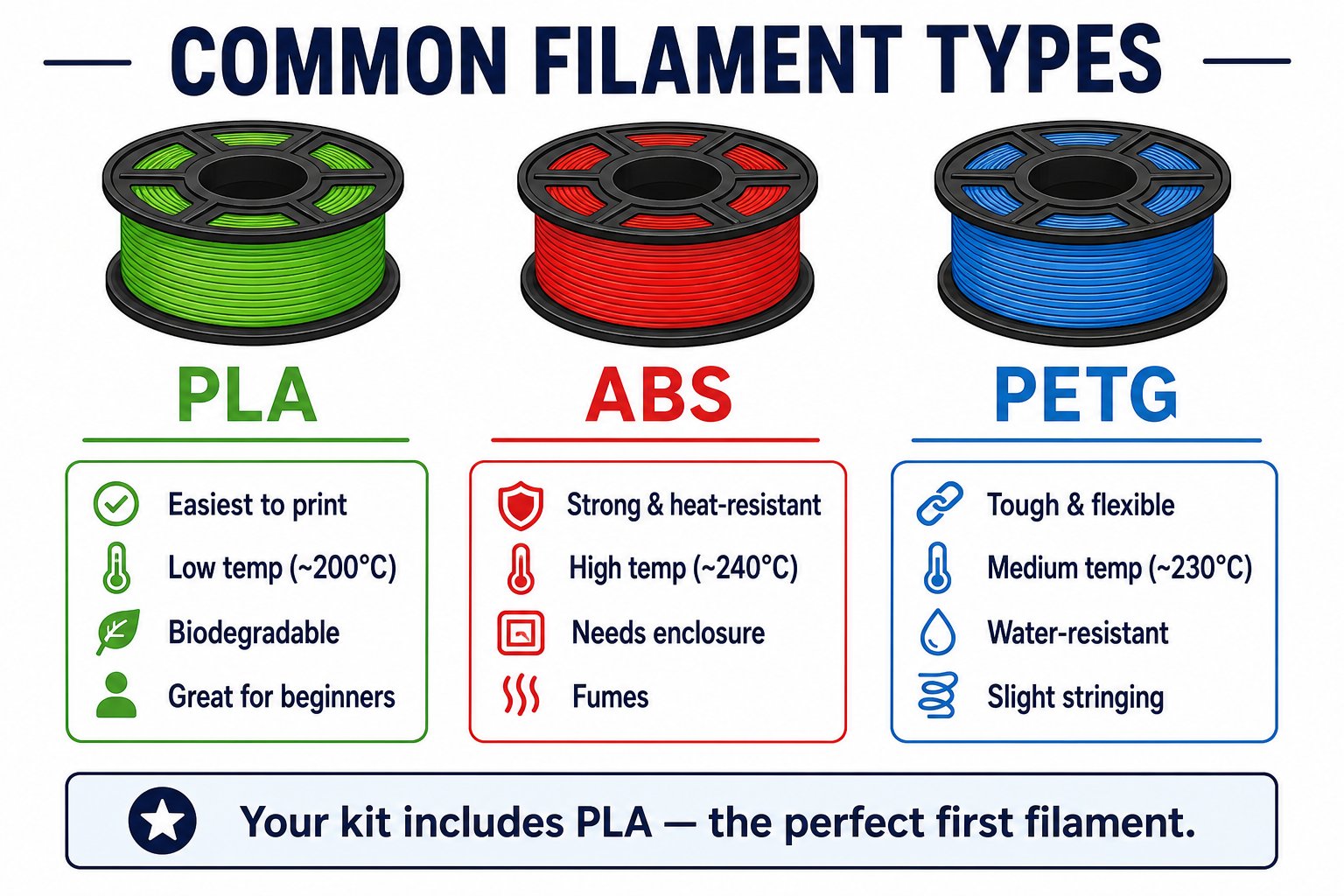 Your kit ships with **PLA** - the easiest filament to print and the best choice for everything you make this week.
## The big three
**Polylactic Acid** - made from renewable plant starch (corn, sugarcane).
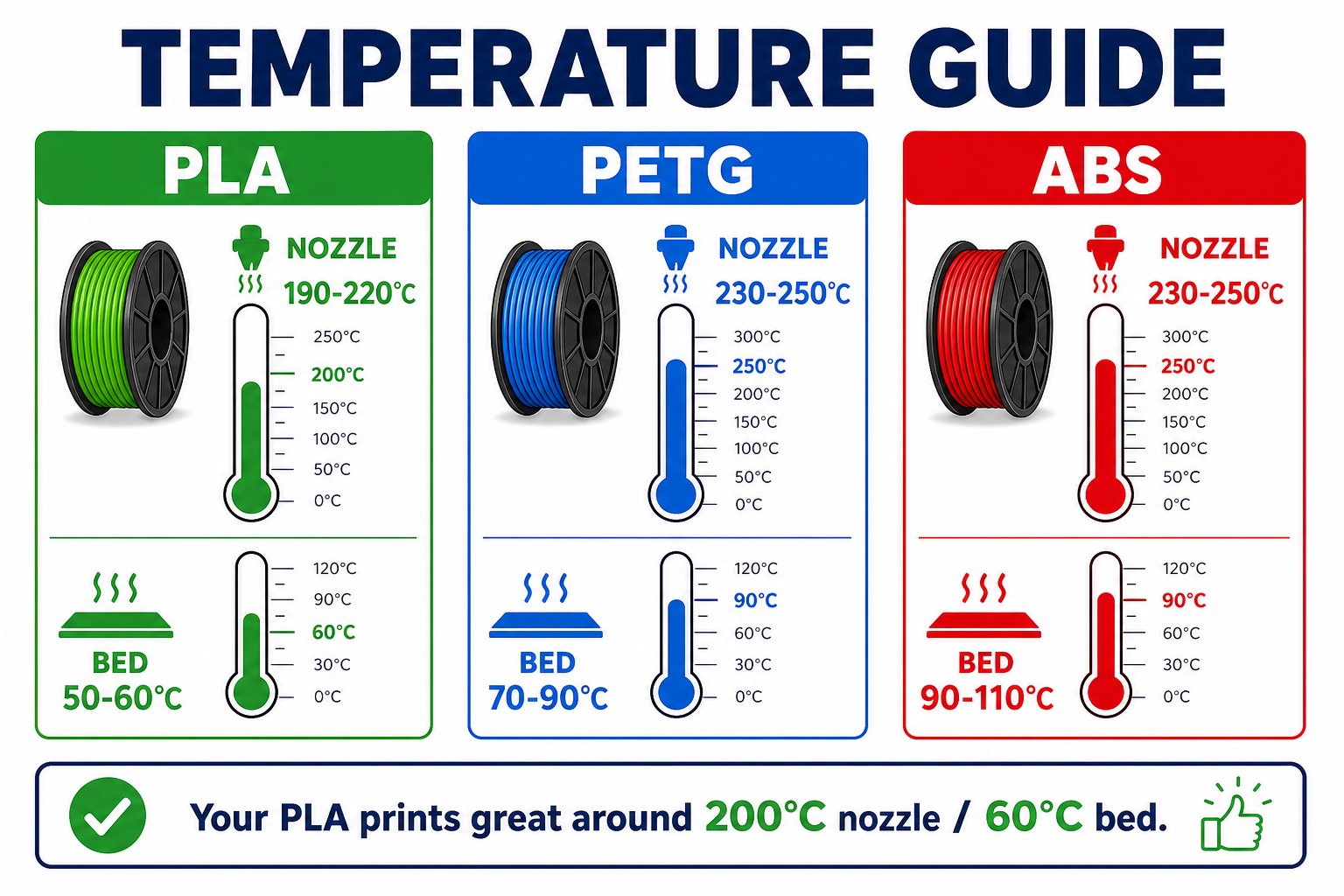
* **Print temp**: \~190-220 C, bed \~50-60 C
* **Pros**: Easiest to print, low warping, no strong fumes, biodegradable, comes in every color
* **Cons**: Can soften in a hot car or direct sun; less impact-resistant than others
* **Best for**: Beginners, models, prototypes, decorations, everything in this camp
**Acrylonitrile Butadiene Styrene** - the plastic LEGO bricks are made of.
* **Print temp**: \~230-250 C, bed \~90-110 C
* **Pros**: Strong, durable, heat-resistant, can be smoothed with acetone
* **Cons**: Warps easily, needs an **enclosure**, and releases fumes - ventilation required
* **Best for**: Functional parts that must survive heat or stress
**Polyethylene Terephthalate Glycol** - the material of water bottles, tuned for printing.
* **Print temp**: \~230-250 C, bed \~70-90 C
* **Pros**: Tough and slightly flexible, water-resistant, food-safe grades exist
* **Cons**: Can string and ooze; needs dialed-in retraction settings
* **Best for**: Mechanical parts, outdoor items, containers
## How properties affect your print
Your kit ships with **PLA** - the easiest filament to print and the best choice for everything you make this week.
## The big three
**Polylactic Acid** - made from renewable plant starch (corn, sugarcane).
* **Print temp**: \~190-220 C, bed \~50-60 C
* **Pros**: Easiest to print, low warping, no strong fumes, biodegradable, comes in every color
* **Cons**: Can soften in a hot car or direct sun; less impact-resistant than others
* **Best for**: Beginners, models, prototypes, decorations, everything in this camp
**Acrylonitrile Butadiene Styrene** - the plastic LEGO bricks are made of.
* **Print temp**: \~230-250 C, bed \~90-110 C
* **Pros**: Strong, durable, heat-resistant, can be smoothed with acetone
* **Cons**: Warps easily, needs an **enclosure**, and releases fumes - ventilation required
* **Best for**: Functional parts that must survive heat or stress
**Polyethylene Terephthalate Glycol** - the material of water bottles, tuned for printing.
* **Print temp**: \~230-250 C, bed \~70-90 C
* **Pros**: Tough and slightly flexible, water-resistant, food-safe grades exist
* **Cons**: Can string and ooze; needs dialed-in retraction settings
* **Best for**: Mechanical parts, outdoor items, containers
## How properties affect your print
 | Property | What it means for you |
| --------------------- | -------------------------------------------------------------------------------------------------------------------------------- |
| **Print temperature** | Too cold and layers do not bond (weak, gaps); too hot and you get stringing and blobs |
| **Bed temperature** | Higher bed temps help the first layer stick and stop corners from lifting (warping) |
| **Strength** | Denser infill and higher temps make stronger parts; PETG and ABS beat PLA on toughness |
| **Warping** | ABS warps most, PETG some, PLA least - another reason PLA is the beginner's choice |
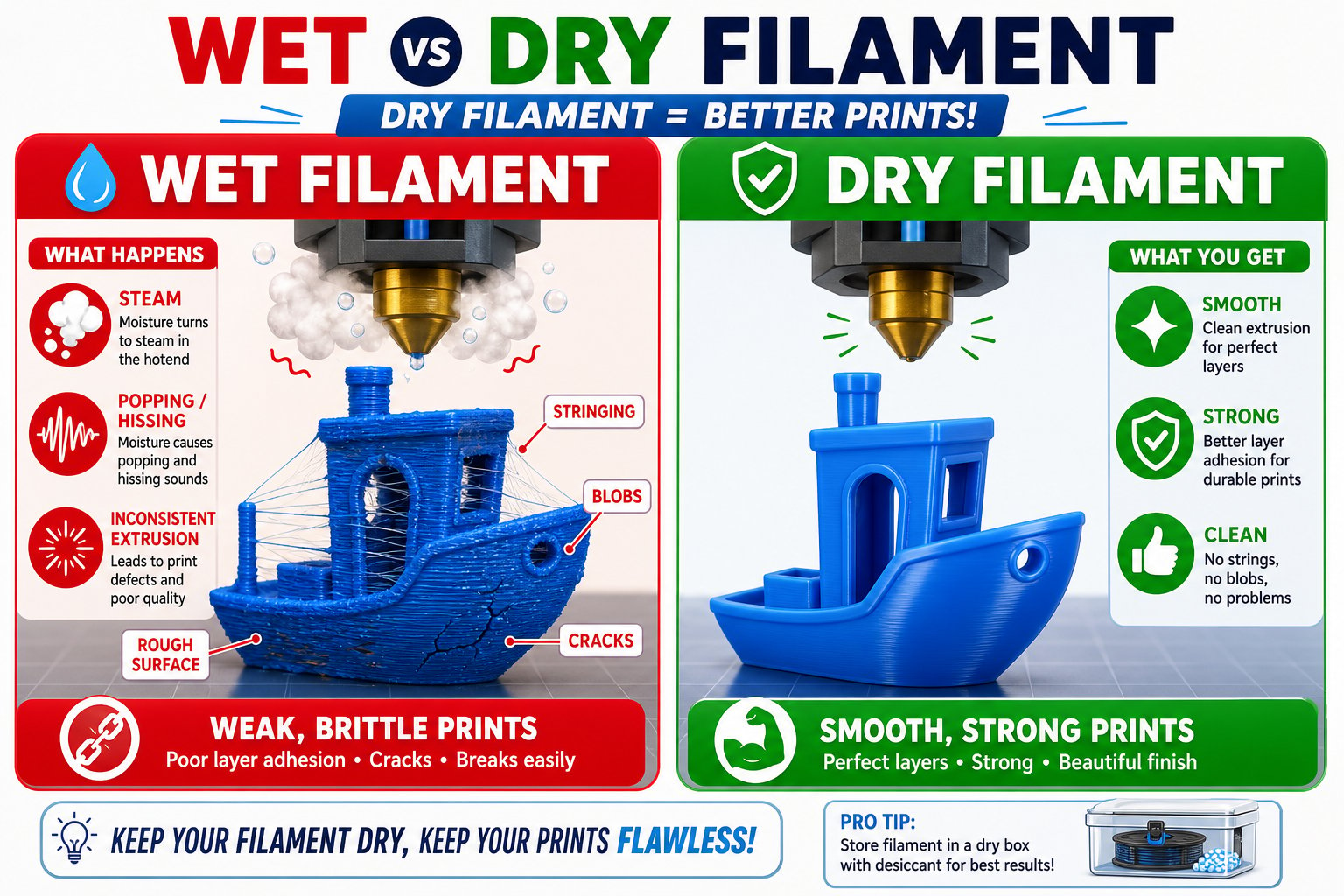
| **Moisture** | Filament absorbs water from the air. Wet filament pops, strings, and prints rough - store spools in a sealed bag with silica gel |
## Beyond the basics
Once you are comfortable, the filament world gets fun:
Glossy, shiny finish - great for decorative prints and multi-color "silk" spools.
A rubbery filament for phone cases, bumpers, and anything that needs to bend.
PLA mixed with wood, glow-in-the-dark, or metal powder for special looks.
## Storing filament
| Property | What it means for you |
| --------------------- | -------------------------------------------------------------------------------------------------------------------------------- |
| **Print temperature** | Too cold and layers do not bond (weak, gaps); too hot and you get stringing and blobs |
| **Bed temperature** | Higher bed temps help the first layer stick and stop corners from lifting (warping) |
| **Strength** | Denser infill and higher temps make stronger parts; PETG and ABS beat PLA on toughness |
| **Warping** | ABS warps most, PETG some, PLA least - another reason PLA is the beginner's choice |
| **Moisture** | Filament absorbs water from the air. Wet filament pops, strings, and prints rough - store spools in a sealed bag with silica gel |
## Beyond the basics
Once you are comfortable, the filament world gets fun:
Glossy, shiny finish - great for decorative prints and multi-color "silk" spools.
A rubbery filament for phone cases, bumpers, and anything that needs to bend.
PLA mixed with wood, glow-in-the-dark, or metal powder for special looks.
## Storing filament
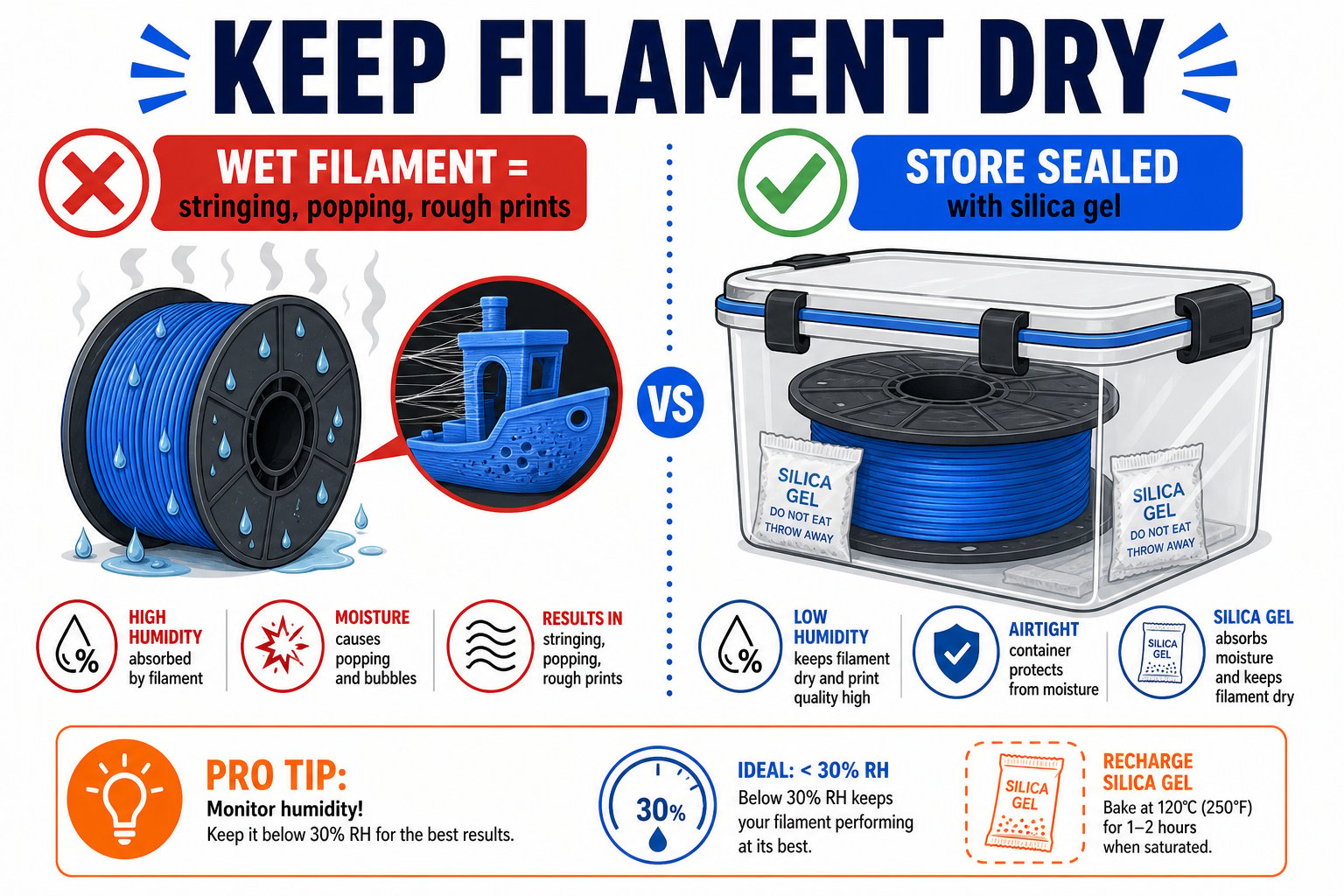 Store spools in a zip bag or airtight box with a **silica gel** desiccant pack.
Humidity is filament's enemy. A dry drawer beats an open shelf.
If prints suddenly get stringy or crackly, your filament may be wet. It can be dried in a filament dryer or a low oven (for PLA, \~45 C).
For your capstone this week, stick with the PLA that came in your kit. It is forgiving, prints beautifully, and lets you focus on your design instead of fighting the material.
Store spools in a zip bag or airtight box with a **silica gel** desiccant pack.
Humidity is filament's enemy. A dry drawer beats an open shelf.
If prints suddenly get stringy or crackly, your filament may be wet. It can be dried in a filament dryer or a low oven (for PLA, \~45 C).
For your capstone this week, stick with the PLA that came in your kit. It is forgiving, prints beautifully, and lets you focus on your design instead of fighting the material.