> ## Documentation Index
> Fetch the complete documentation index at: https://stem-docs.intellectualpoint.com/llms.txt
> Use this file to discover all available pages before exploring further.
# Design project: code-blocks basket
> Use Tinkercad Codeblocks to generate a geometric basket with code - your first taste of parametric, generative design.
## Designing with code
So far you have designed by dragging shapes. Now you will design with **code**. Tinkercad **Codeblocks** lets you build models using visual programming blocks - loops, variables, and math - to create shapes that would be tedious to make by hand. This is your first taste of **parametric design**, where changing one number reshapes the whole model.
 Open **Codeblocks** from the Tinkercad dashboard: **Create → Codeblocks**. It works like Scratch - you snap blocks together instead of typing.
## The idea behind the basket
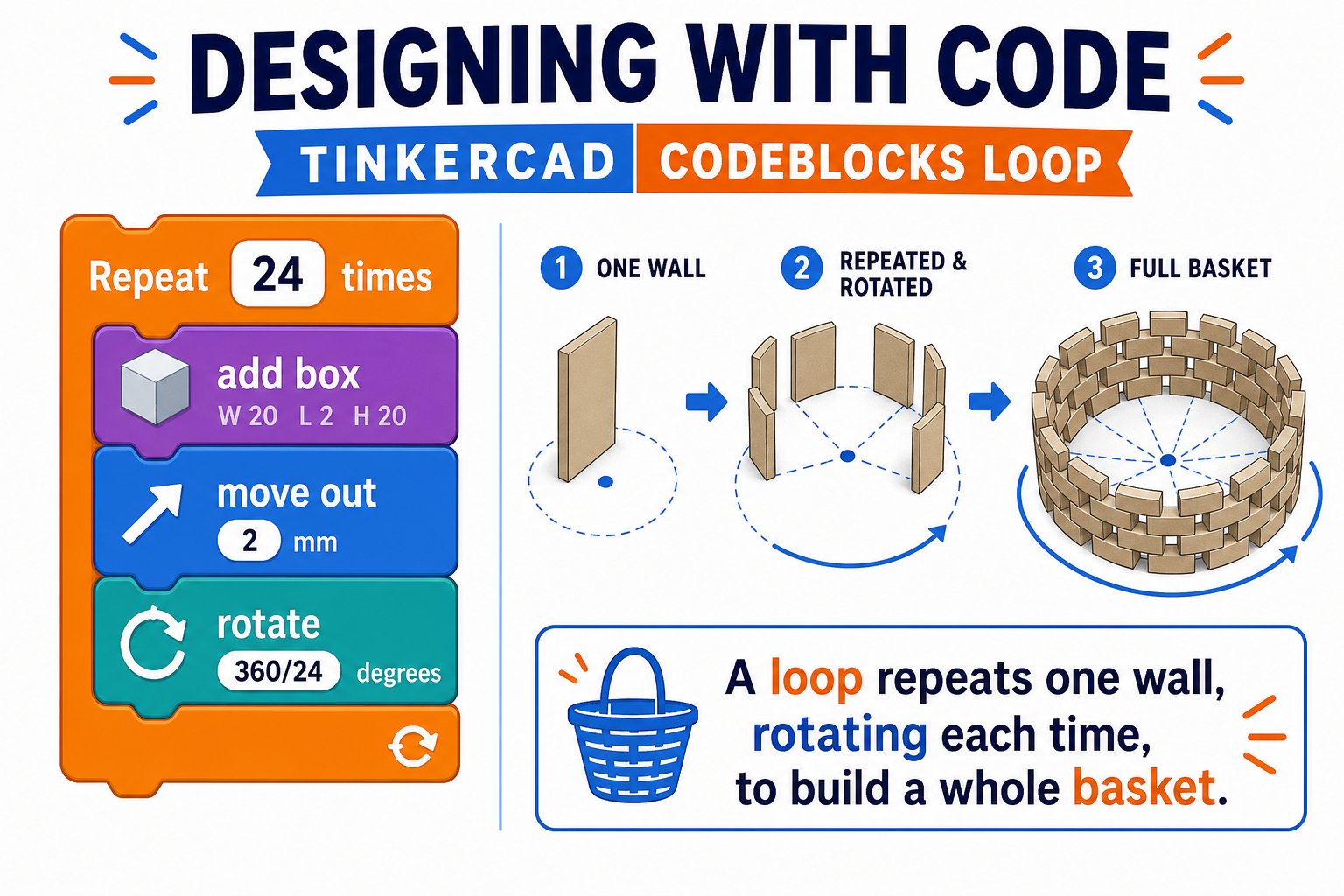
A basket is just a shape **repeated in a circle**. Instead of placing dozens of walls by hand, you tell the computer: "place a wall, rotate a little, repeat." A **loop** does the repeating and a **rotation** spaces the pieces evenly around a center. Change the number of repeats and the basket gets denser; change the rotation and it twists.
Open **Codeblocks** from the Tinkercad dashboard: **Create → Codeblocks**. It works like Scratch - you snap blocks together instead of typing.
## The idea behind the basket
A basket is just a shape **repeated in a circle**. Instead of placing dozens of walls by hand, you tell the computer: "place a wall, rotate a little, repeat." A **loop** does the repeating and a **rotation** spaces the pieces evenly around a center. Change the number of repeats and the basket gets denser; change the rotation and it twists.
 ## Build it step by step
From your dashboard choose **Create → Codeblocks**. You will see a blank canvas and a palette of blocks on the left.
Add a **variable** called `sides` and set it to a number like `24`. This controls how many pieces make up your basket.
Drag a **Repeat** block and set it to repeat `sides` times. Everything inside runs once per side.
Inside the loop, add a **Box** (a thin tall wall). Give it a small width and a height for your basket wall.
Move the box outward along one axis so it sits on the rim of a circle, not at the center.
Add a **Rotate** block that turns by `360 / sides` degrees each loop. After a full loop, the pieces form a complete ring - your basket wall.
Outside the loop, add a flat **Cylinder** at the bottom so the basket has a floor.
Press **Run**. Watch it build the basket piece by piece. Change `sides`, the wall height, or the radius and run again to see how the design responds.
## Why this is powerful
## Build it step by step
From your dashboard choose **Create → Codeblocks**. You will see a blank canvas and a palette of blocks on the left.
Add a **variable** called `sides` and set it to a number like `24`. This controls how many pieces make up your basket.
Drag a **Repeat** block and set it to repeat `sides` times. Everything inside runs once per side.
Inside the loop, add a **Box** (a thin tall wall). Give it a small width and a height for your basket wall.
Move the box outward along one axis so it sits on the rim of a circle, not at the center.
Add a **Rotate** block that turns by `360 / sides` degrees each loop. After a full loop, the pieces form a complete ring - your basket wall.
Outside the loop, add a flat **Cylinder** at the bottom so the basket has a floor.
Press **Run**. Watch it build the basket piece by piece. Change `sides`, the wall height, or the radius and run again to see how the design responds.
## Why this is powerful
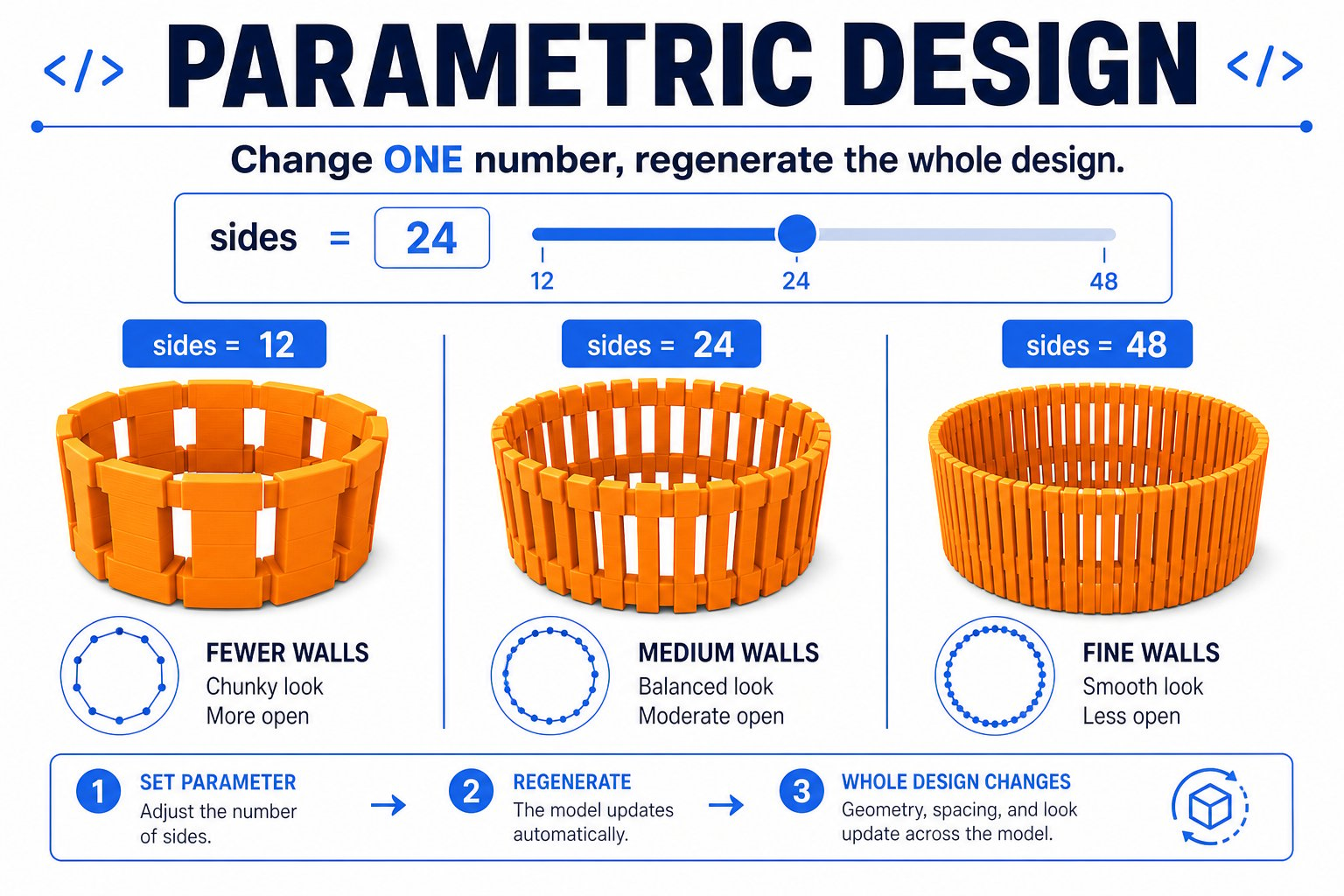 Adjust `sides` from 12 to 48 and the whole basket regenerates. That is parametric design.
The computer repeats perfectly what would take you forever to place by hand.
`360 / sides` guarantees the pieces are always evenly spaced, no matter the count.
Codeblocks designs export to `.stl` and print exactly like drag-and-drop designs.
## Slice and print
Export your basket to STL, open it in Cura, and slice with beginner settings. Because a basket has thin walls and open sides, consider:
* **A brim** for extra first-layer grip
* **Slower speed** for clean thin walls
* **Vase mode** (optional) for a single continuous spiral wall
Codeblocks is a bridge between design and programming. If you enjoy it, the same ideas - variables, loops, and math - power professional CAD tools like OpenSCAD and Fusion 360.
You built a basket with code, changed a variable to reshape it, and exported it to print. You just did generative design!
Adjust `sides` from 12 to 48 and the whole basket regenerates. That is parametric design.
The computer repeats perfectly what would take you forever to place by hand.
`360 / sides` guarantees the pieces are always evenly spaced, no matter the count.
Codeblocks designs export to `.stl` and print exactly like drag-and-drop designs.
## Slice and print
Export your basket to STL, open it in Cura, and slice with beginner settings. Because a basket has thin walls and open sides, consider:
* **A brim** for extra first-layer grip
* **Slower speed** for clean thin walls
* **Vase mode** (optional) for a single continuous spiral wall
Codeblocks is a bridge between design and programming. If you enjoy it, the same ideas - variables, loops, and math - power professional CAD tools like OpenSCAD and Fusion 360.
You built a basket with code, changed a variable to reshape it, and exported it to print. You just did generative design!