> ## Documentation Index
> Fetch the complete documentation index at: https://stem-docs.intellectualpoint.com/llms.txt
> Use this file to discover all available pages before exploring further.
# Introduction to 3D Printing
> Build a real 3D printer from a kit, learn how it works, design your own models in CAD, and print a capstone project - all in five days.
## From a box of parts to your own creations
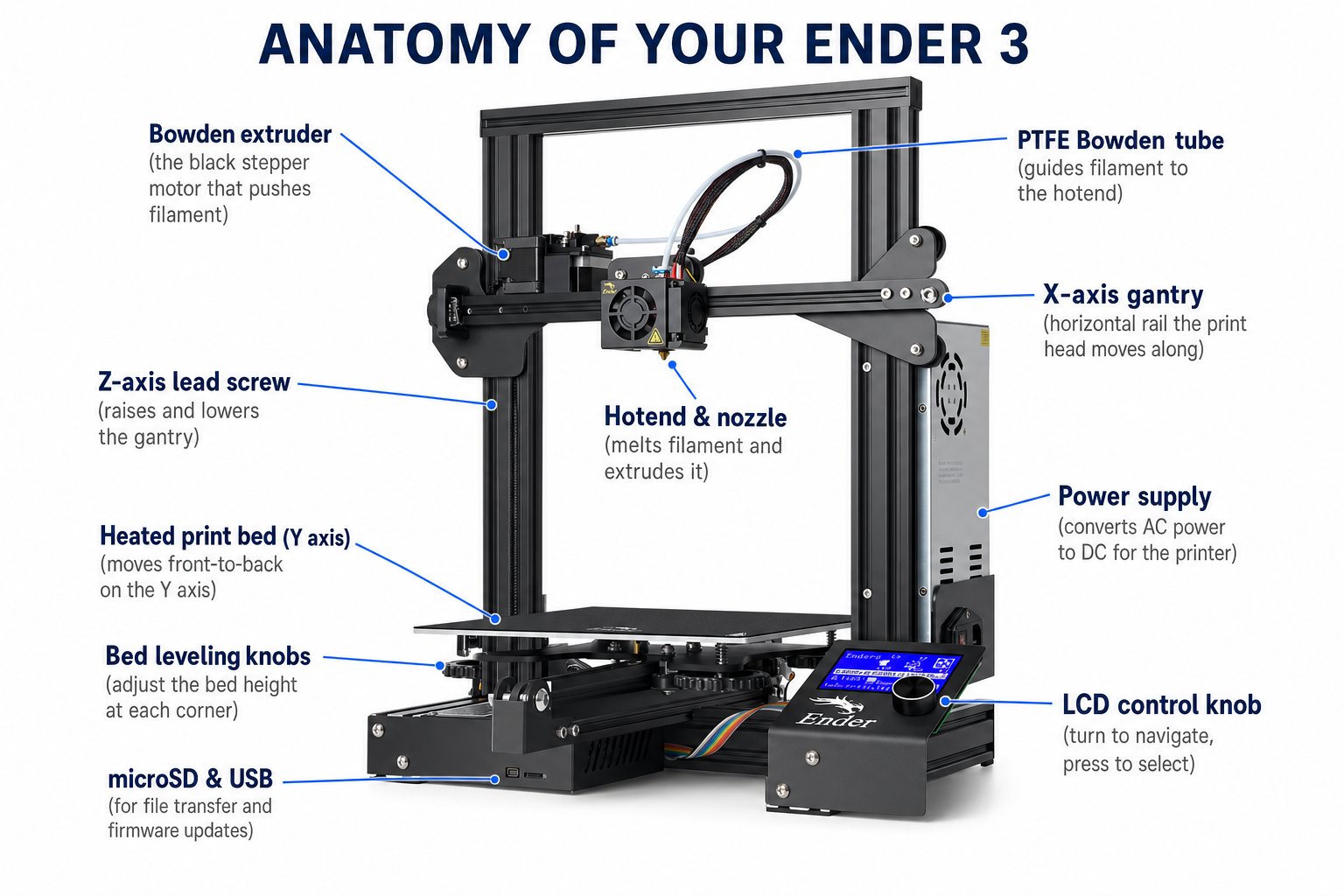
Welcome to the **Introduction to 3D Printing & Modeling** STEM Workshop. Over five days you will take a Creality Ender 3 printer out of the box, build it piece by piece, calibrate it, learn to design your own 3D models, and print a capstone project you invent yourself. No experience needed - by Friday you will own a machine you understand and know how to use.
This is a fully virtual, facilitator-led camp. Each student receives a Creality Ender 3 3D printer kit shipped to their home. You will assemble and keep your printer.
 ### What you will learn
By the end of this week you will be able to:
* **Explain how FDM 3D printing works**, from a spool of filament to a finished part
* **Assemble a 3D printer** from a kit - the frame, gantry, extruder, belts, wiring, and bed
* **Level the bed and load filament** so your first layer sticks every time
* **Slice a model into G-code** with UltiMaker Cura and run a print
* **Design your own 3D models** in Tinkercad, from a name-tag keychain to a code-built basket
* **Choose filaments** (PLA, ABS, PETG) and understand how print settings affect quality
* **Diagnose and fix** the most common print problems
* **Design, print, and present** a capstone project of your own
### Your week at a glance
How 3D printing works, the history of the technology, the anatomy of your Ender 3, and the kickoff of your capstone project.
Unbox your Ender 3 and build it step by step - frame, power supply, LCD, Z-axis, extruder, belts, rails, spool holder, wiring, and bed.
Load filament, power on, level the bed with the paper test, run your first print, then install Cura and set up Tinkercad.
Design your own models in Tinkercad, learn filament types and print technologies, and master troubleshooting and maintenance.
Design and print your capstone project, explore online model libraries, present your work, and earn your certificate.
### The capstone project
Throughout the week you will plan, design, print, and present a project of your own. You pick your idea early, build the skills across the week, and present your finished model on Day 5. You are judged on creativity, effort, and problem-solving - not just perfection.
Pick a model to design or download and present your plan to the class.
Model it in Tinkercad, slice it, and print it across the middle of the week.
Show your work on Day 5. You are judged on effort and problem-solving.
### Camp format
* **Schedule**: Monday through Friday, 9:30 AM to 12:30 PM daily
* **Delivery**: Fully virtual with live facilitator-led instruction
* **Duration**: 3 hours per day, 5 days
* **Hardware**: Creality Ender 3 printer kit (shipped to each student)
### Your printer at a glance
The **Creality Ender 3** is the most popular beginner FDM 3D printer in the world - reliable, upgradable, and backed by a huge community.
| Specification | Value |
| ---------------------- | ----------------------------------------- |
| Build volume | 220 x 220 x 250 mm |
| Default nozzle | 0.4 mm |
| Layer thickness | 0.1 - 0.4 mm |
| Print speed | up to \~180 mm/s (40-60 mm/s recommended) |
| Max nozzle temperature | 255 C |
| Max bed temperature | 110 C |
| Supported filaments | PLA, PETG, ABS, TPU |
| Connectivity | microSD card, USB |
| Assembly | Semi-assembled kit (you build it) |
### Before you start
Confirm your Ender 3 kit has arrived and you have a clear, flat workspace, good lighting, and about an hour set aside for the Day 2 build.
The nozzle and heated bed reach high temperatures during printing. Never touch the nozzle or bed while the printer is heating or running, keep the power supply voltage switch set correctly for your region, and always print in a well-ventilated space.
### What you will learn
By the end of this week you will be able to:
* **Explain how FDM 3D printing works**, from a spool of filament to a finished part
* **Assemble a 3D printer** from a kit - the frame, gantry, extruder, belts, wiring, and bed
* **Level the bed and load filament** so your first layer sticks every time
* **Slice a model into G-code** with UltiMaker Cura and run a print
* **Design your own 3D models** in Tinkercad, from a name-tag keychain to a code-built basket
* **Choose filaments** (PLA, ABS, PETG) and understand how print settings affect quality
* **Diagnose and fix** the most common print problems
* **Design, print, and present** a capstone project of your own
### Your week at a glance
How 3D printing works, the history of the technology, the anatomy of your Ender 3, and the kickoff of your capstone project.
Unbox your Ender 3 and build it step by step - frame, power supply, LCD, Z-axis, extruder, belts, rails, spool holder, wiring, and bed.
Load filament, power on, level the bed with the paper test, run your first print, then install Cura and set up Tinkercad.
Design your own models in Tinkercad, learn filament types and print technologies, and master troubleshooting and maintenance.
Design and print your capstone project, explore online model libraries, present your work, and earn your certificate.
### The capstone project
Throughout the week you will plan, design, print, and present a project of your own. You pick your idea early, build the skills across the week, and present your finished model on Day 5. You are judged on creativity, effort, and problem-solving - not just perfection.
Pick a model to design or download and present your plan to the class.
Model it in Tinkercad, slice it, and print it across the middle of the week.
Show your work on Day 5. You are judged on effort and problem-solving.
### Camp format
* **Schedule**: Monday through Friday, 9:30 AM to 12:30 PM daily
* **Delivery**: Fully virtual with live facilitator-led instruction
* **Duration**: 3 hours per day, 5 days
* **Hardware**: Creality Ender 3 printer kit (shipped to each student)
### Your printer at a glance
The **Creality Ender 3** is the most popular beginner FDM 3D printer in the world - reliable, upgradable, and backed by a huge community.
| Specification | Value |
| ---------------------- | ----------------------------------------- |
| Build volume | 220 x 220 x 250 mm |
| Default nozzle | 0.4 mm |
| Layer thickness | 0.1 - 0.4 mm |
| Print speed | up to \~180 mm/s (40-60 mm/s recommended) |
| Max nozzle temperature | 255 C |
| Max bed temperature | 110 C |
| Supported filaments | PLA, PETG, ABS, TPU |
| Connectivity | microSD card, USB |
| Assembly | Semi-assembled kit (you build it) |
### Before you start
Confirm your Ender 3 kit has arrived and you have a clear, flat workspace, good lighting, and about an hour set aside for the Day 2 build.
The nozzle and heated bed reach high temperatures during printing. Never touch the nozzle or bed while the printer is heating or running, keep the power supply voltage switch set correctly for your region, and always print in a well-ventilated space.