> ## Documentation Index
> Fetch the complete documentation index at: https://stem-docs.intellectualpoint.com/llms.txt
> Use this file to discover all available pages before exploring further.
# Troubleshooting
> Diagnose and fix the most common 3D printing failures, from bed adhesion to clogs and stringing.
## Every printer has bad prints
Failed prints are part of 3D printing - even for experts. The skill is not avoiding every failure; it is **diagnosing** what went wrong and fixing it. Because you understand the full print journey, you can trace almost any problem back to one of a few causes: adhesion, temperature, calibration, filament, or mechanics.
Remember the "fail forward" mindset from the contest. A failed print you understand is worth more than a lucky success you cannot explain.
 ## First-layer and adhesion problems
The first layer causes the most failures. Fix these first.
**Causes:** nozzle too far from the bed, bed too cold, dirty surface, or no adhesive.
**Fixes:**
* Re-run auto calibration so the first-layer gap is correct
* Raise the bed temperature (about 60 C for PLA)
* Clean the plate with isopropyl alcohol to remove finger oils
* Apply a thin layer of the included glue stick
* Add a **brim** in the slicer for more grip
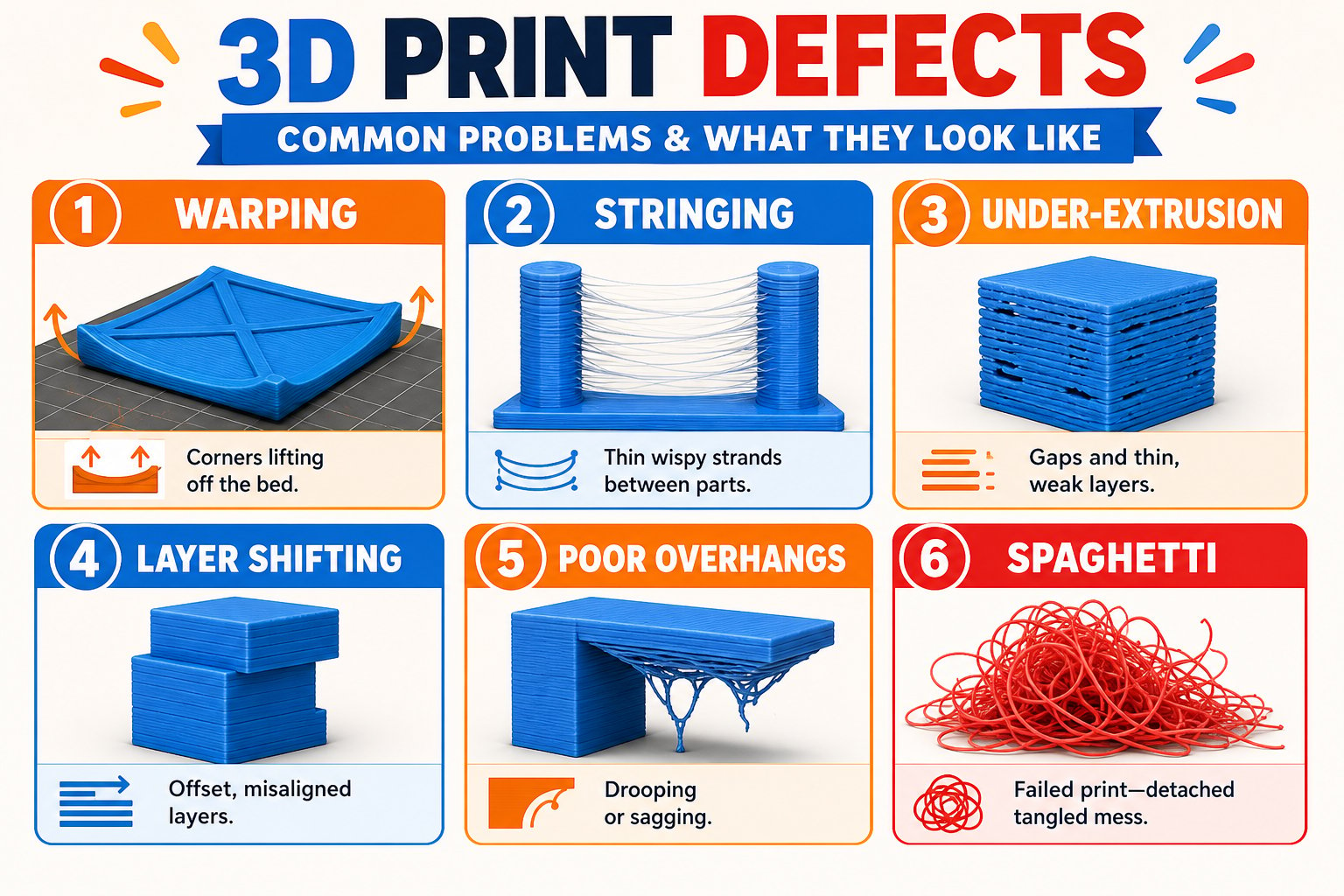
**Causes:** the print cools unevenly and contracts, pulling corners off the bed. Worst with ABS, better with PLA.
**Fixes:**
* Increase bed temperature and use glue
* Add a brim or raft
* Keep the printer away from cold drafts and open windows
* For warp-prone materials, use an enclosure
**Causes:** first layers squished too much by heat and weight.
**Fixes:**
* Lower the bed temperature slightly
* Reduce first-layer squish (raise the nozzle a hair via Z-offset)
## Extrusion problems
Thin wisps of plastic strung between parts of the print.
**Fixes:**
* **Dry your filament** - moisture is the top cause
* Increase retraction in the slicer
* Lower the nozzle temperature slightly
Not enough plastic coming out - weak, gappy prints.
**Fixes:**
* Check for a partial **clog** and clean the nozzle
* Raise the nozzle temperature a little
* Make sure filament feeds freely and the spool is not tangled
Too much plastic, leaving blobs and messy surfaces.
**Fixes:**
* Lower the extrusion multiplier / flow rate in the slicer
* Lower the nozzle temperature slightly
Nothing (or very little) extrudes, sometimes with clicking from the extruder.
**Fixes:**
* Heat the nozzle and gently push filament through by hand
* Use the **unclogging pin** from your kit to clear the tip
* Try a "cold pull" to remove debris
* Replace the nozzle if it stays blocked
## Layer and quality problems
Layers suddenly offset sideways, ruining alignment.
**Fixes:**
* Slow the print speed down
* Make sure nothing is obstructing the print head or bed
* Check that belts are tensioned and pulleys are tight
The print pops loose and the printer keeps extruding into the air.
**Fixes:**
* Fix first-layer adhesion (see above)
* Add supports for tall or top-heavy models
* Use the app or camera to catch failures early and stop the print
Steep overhangs sag or curl.
**Fixes:**
* Enable and increase **part cooling** fan speed
* Add **supports** in the slicer for overhangs beyond \~45 degrees
* Slow down on overhang layers
The top surface has holes or looks incomplete.
**Fixes:**
* Increase top layer count in the slicer
* Increase infill density so top layers have more to rest on
## A simple troubleshooting method
Look closely. When did it fail - first layer, mid-print, or overhang? What does the defect look like?
Match the symptom to a stage of the print journey: adhesion, temperature, extrusion, or mechanics.
Adjust a single setting at a time so you know what actually fixed it.
Re-print and note the result. Keep a short log of what worked - future you will thank you.
## Quick reference
| Symptom | Most likely fix |
| ------------------ | ------------------------------------------------- |
| Not sticking | Re-calibrate, clean bed, add glue, raise bed temp |
| Warping | Higher bed temp, brim, no drafts |
| Stringing | Dry filament, more retraction, lower temp |
| Under-extrusion | Clear clog, raise temp, free the filament path |
| Clog | Unclogging pin, cold pull, replace nozzle |
| Layer shift | Slow down, check belts and obstructions |
| Spaghetti | Fix first layer, add supports |
| Drooping overhangs | More cooling, add supports |
If you are stuck on your contest print, do not just retry the same thing. Use the method above to change one variable, and remember - the problem-solving is worth 15 points in judging.
You can trace a failed print to its cause and apply a targeted fix. You know where the unclogging pin, glue stick, and slicer settings come in.
## First-layer and adhesion problems
The first layer causes the most failures. Fix these first.
**Causes:** nozzle too far from the bed, bed too cold, dirty surface, or no adhesive.
**Fixes:**
* Re-run auto calibration so the first-layer gap is correct
* Raise the bed temperature (about 60 C for PLA)
* Clean the plate with isopropyl alcohol to remove finger oils
* Apply a thin layer of the included glue stick
* Add a **brim** in the slicer for more grip
**Causes:** the print cools unevenly and contracts, pulling corners off the bed. Worst with ABS, better with PLA.
**Fixes:**
* Increase bed temperature and use glue
* Add a brim or raft
* Keep the printer away from cold drafts and open windows
* For warp-prone materials, use an enclosure
**Causes:** first layers squished too much by heat and weight.
**Fixes:**
* Lower the bed temperature slightly
* Reduce first-layer squish (raise the nozzle a hair via Z-offset)
## Extrusion problems
Thin wisps of plastic strung between parts of the print.
**Fixes:**
* **Dry your filament** - moisture is the top cause
* Increase retraction in the slicer
* Lower the nozzle temperature slightly
Not enough plastic coming out - weak, gappy prints.
**Fixes:**
* Check for a partial **clog** and clean the nozzle
* Raise the nozzle temperature a little
* Make sure filament feeds freely and the spool is not tangled
Too much plastic, leaving blobs and messy surfaces.
**Fixes:**
* Lower the extrusion multiplier / flow rate in the slicer
* Lower the nozzle temperature slightly
Nothing (or very little) extrudes, sometimes with clicking from the extruder.
**Fixes:**
* Heat the nozzle and gently push filament through by hand
* Use the **unclogging pin** from your kit to clear the tip
* Try a "cold pull" to remove debris
* Replace the nozzle if it stays blocked
## Layer and quality problems
Layers suddenly offset sideways, ruining alignment.
**Fixes:**
* Slow the print speed down
* Make sure nothing is obstructing the print head or bed
* Check that belts are tensioned and pulleys are tight
The print pops loose and the printer keeps extruding into the air.
**Fixes:**
* Fix first-layer adhesion (see above)
* Add supports for tall or top-heavy models
* Use the app or camera to catch failures early and stop the print
Steep overhangs sag or curl.
**Fixes:**
* Enable and increase **part cooling** fan speed
* Add **supports** in the slicer for overhangs beyond \~45 degrees
* Slow down on overhang layers
The top surface has holes or looks incomplete.
**Fixes:**
* Increase top layer count in the slicer
* Increase infill density so top layers have more to rest on
## A simple troubleshooting method
Look closely. When did it fail - first layer, mid-print, or overhang? What does the defect look like?
Match the symptom to a stage of the print journey: adhesion, temperature, extrusion, or mechanics.
Adjust a single setting at a time so you know what actually fixed it.
Re-print and note the result. Keep a short log of what worked - future you will thank you.
## Quick reference
| Symptom | Most likely fix |
| ------------------ | ------------------------------------------------- |
| Not sticking | Re-calibrate, clean bed, add glue, raise bed temp |
| Warping | Higher bed temp, brim, no drafts |
| Stringing | Dry filament, more retraction, lower temp |
| Under-extrusion | Clear clog, raise temp, free the filament path |
| Clog | Unclogging pin, cold pull, replace nozzle |
| Layer shift | Slow down, check belts and obstructions |
| Spaghetti | Fix first layer, add supports |
| Drooping overhangs | More cooling, add supports |
If you are stuck on your contest print, do not just retry the same thing. Use the method above to change one variable, and remember - the problem-solving is worth 15 points in judging.
You can trace a failed print to its cause and apply a targeted fix. You know where the unclogging pin, glue stick, and slicer settings come in.