> ## Documentation Index
> Fetch the complete documentation index at: https://stem-docs.intellectualpoint.com/llms.txt
> Use this file to discover all available pages before exploring further.
# Nozzles
> How nozzle material, diameter, and shape change your prints, and how to choose the right nozzle for the job.
## The most important small part
The **nozzle** is the tiny tip that deposits every line of melted plastic. Its material, diameter, and shape have a huge effect on print speed, detail, strength, and how long your printer lasts. The right nozzle gives smooth extrusion and clean results; the wrong one causes clogs, wear, and poor quality.
Your Adventurer 5M ships with a **0.4 mm brass nozzle** - the perfect all-around choice for PLA and PETG. You do not need to change it to start printing.
## Nozzle diameter
Diameter sets the width of the extruded line, which trades off **detail** against **speed and strength**.
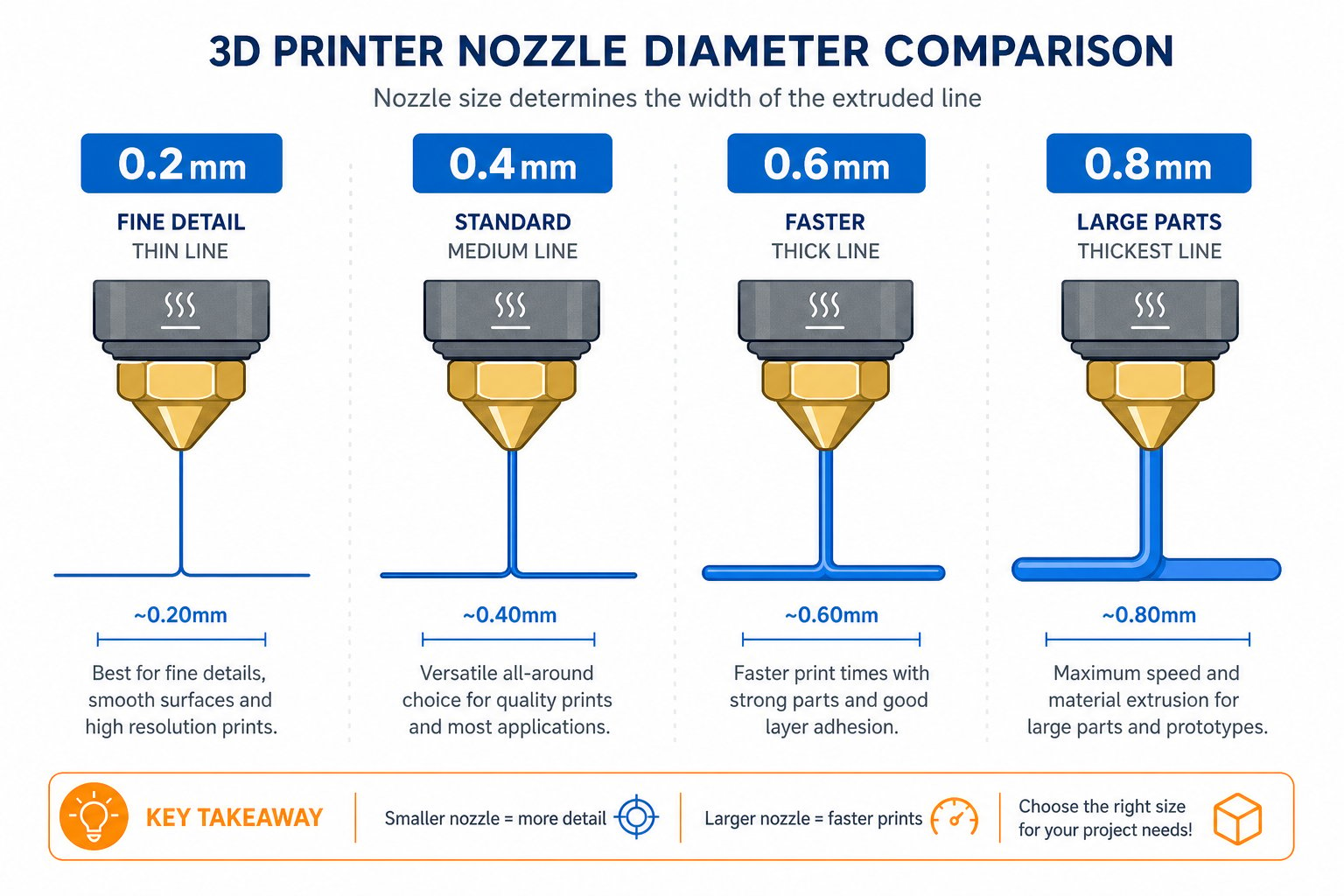 | Diameter | Best for | Pros | Cons |
| -------- | ----------------------------- | --------------------------------------- | ---------------------------- |
| 0.2 mm | Miniatures, fine detail | Highest resolution | Very slow, clogs easily |
| 0.4 mm | General purpose (default) | Great speed and detail balance | The standard for good reason |
| 0.6 mm | Faster, stronger prints | Durable layers, handles thick filaments | Slightly less detail |
| 0.8 mm+ | Large parts, quick prototypes | Very fast, strong walls | Low resolution |
Rule of thumb: **smaller nozzle = more detail, larger nozzle = faster and stronger.** Most people never need to leave 0.4 mm.
## Nozzle material
The metal a nozzle is made from determines how well it handles heat and how fast it wears out - especially with abrasive filaments.
| Material | Hardness | Best for | Notes |
| --------------- | ------------------------- | ------------------------------------------ | --------------------------------------------- |
| Brass | Soft | PLA, PETG, ABS | Best heat transfer; wears fast with abrasives |
| Hardened steel | Very hard | Carbon fiber, glow-in-the-dark, metal-fill | Lower heat transfer, may need higher temps |
| Stainless steel | Moderate | Food-safe, medical | Non-reactive |
| Ruby-tipped | Extremely hard | All materials, especially abrasive | Excellent but expensive |
| Plated copper | Hard, great heat transfer | Nylon, PC | Corrosion resistant, high heat |
| Diameter | Best for | Pros | Cons |
| -------- | ----------------------------- | --------------------------------------- | ---------------------------- |
| 0.2 mm | Miniatures, fine detail | Highest resolution | Very slow, clogs easily |
| 0.4 mm | General purpose (default) | Great speed and detail balance | The standard for good reason |
| 0.6 mm | Faster, stronger prints | Durable layers, handles thick filaments | Slightly less detail |
| 0.8 mm+ | Large parts, quick prototypes | Very fast, strong walls | Low resolution |
Rule of thumb: **smaller nozzle = more detail, larger nozzle = faster and stronger.** Most people never need to leave 0.4 mm.
## Nozzle material
The metal a nozzle is made from determines how well it handles heat and how fast it wears out - especially with abrasive filaments.
| Material | Hardness | Best for | Notes |
| --------------- | ------------------------- | ------------------------------------------ | --------------------------------------------- |
| Brass | Soft | PLA, PETG, ABS | Best heat transfer; wears fast with abrasives |
| Hardened steel | Very hard | Carbon fiber, glow-in-the-dark, metal-fill | Lower heat transfer, may need higher temps |
| Stainless steel | Moderate | Food-safe, medical | Non-reactive |
| Ruby-tipped | Extremely hard | All materials, especially abrasive | Excellent but expensive |
| Plated copper | Hard, great heat transfer | Nylon, PC | Corrosion resistant, high heat |
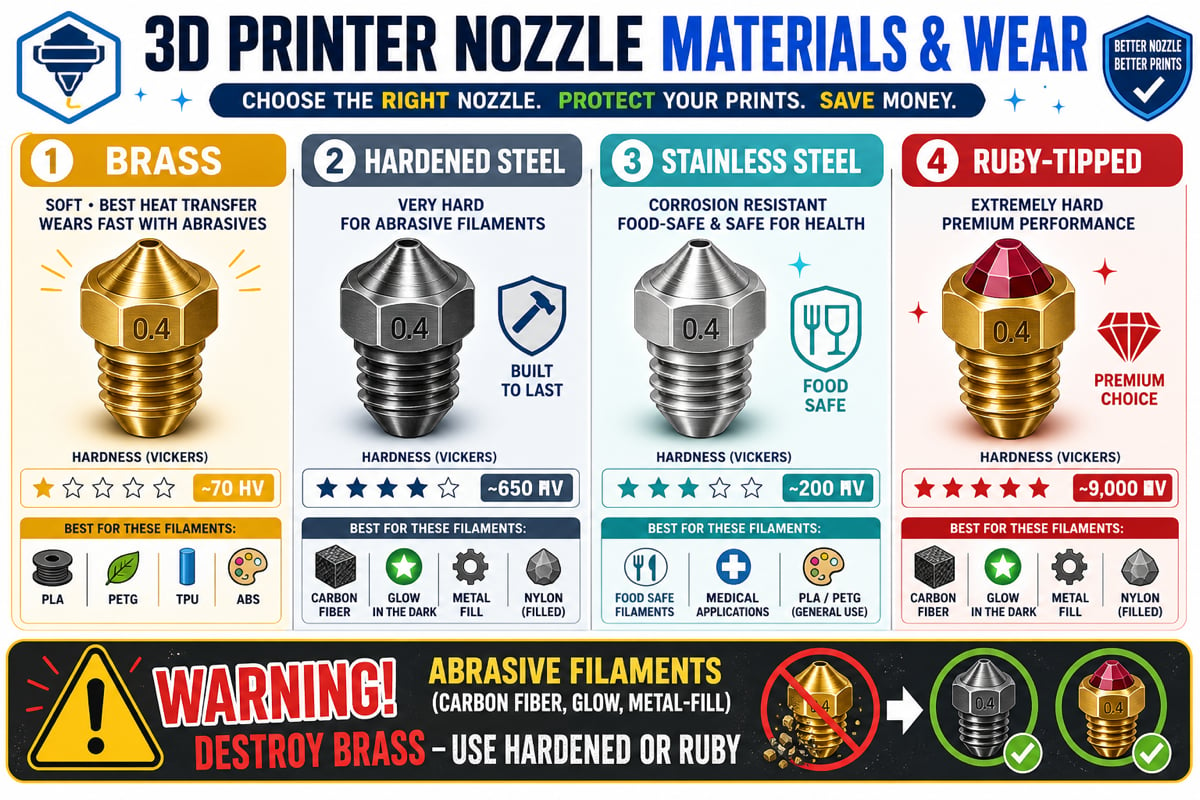 **Never use a brass nozzle with abrasive filaments** like carbon fiber, glow-in-the-dark, or metal-fill. The abrasives grind soft brass away quickly and can ruin dimensional accuracy. Use hardened steel or ruby instead.
## Nozzle shape and thread
Nozzles are not universal. They differ by **thread size** and internal shape, and they must match your hotend.
Short, squat body with a wide base. The most common budget and mid-range nozzle (Creality, Ender 3). Uses an M6 thread.
Tapered and slightly larger, using an **M7 thread**. Used on many Flashforge and older MakerBot printers. **Not interchangeable** with M6 nozzles - check your thread before buying.
Slim, tapered nozzle for precision printing and all-metal hotends (E3D V6, Prusa MK3). Uses M6.
Extended melt zones for very fast, high-volume, or large prints. Requires matching Volcano hardware.
A larger internal channel that reduces backpressure so you can print faster with thick filaments (Bambu Lab, Bondtech CHT).
An E3D-style brass or copper body with a ruby tip for near wear-proof printing of abrasive materials.
Always confirm your printer's **nozzle thread** (M6 vs M7) before buying a replacement. The Adventurer 5M uses its own nozzle assembly - use Flashforge-compatible nozzles.
## Choosing the right nozzle
| Use case | Recommended nozzle |
| -------------------------- | ----------------------------------- |
| General use (PLA, PETG) | 0.4 mm brass |
| High-detail models | 0.2 - 0.3 mm brass |
| Fast and strong prints | 0.6 - 0.8 mm hardened steel |
| Abrasive filaments | 0.4 - 0.6 mm hardened steel or ruby |
| High-temperature materials | Plated copper or stainless steel |
## When to change your nozzle
Move to a hardened or ruby nozzle before printing carbon fiber, glow, or metal-fill.
Drop to 0.2 - 0.3 mm for miniatures, or move up to 0.6 - 0.8 mm for speed and strength.
A worn or partially blocked nozzle causes gaps and weak prints. Clean it or replace it.
A scraped or dinged nozzle tip ruins first layers. Swap it out.
After replacing a nozzle, always **re-level and re-calibrate**. A new nozzle can sit at a slightly different height, which changes your critical first-layer gap.
You understand how nozzle diameter, material, and shape affect printing, why abrasive filaments need hard nozzles, and when to change your nozzle. For this camp, your stock 0.4 mm nozzle is all you need.
**Never use a brass nozzle with abrasive filaments** like carbon fiber, glow-in-the-dark, or metal-fill. The abrasives grind soft brass away quickly and can ruin dimensional accuracy. Use hardened steel or ruby instead.
## Nozzle shape and thread
Nozzles are not universal. They differ by **thread size** and internal shape, and they must match your hotend.
Short, squat body with a wide base. The most common budget and mid-range nozzle (Creality, Ender 3). Uses an M6 thread.
Tapered and slightly larger, using an **M7 thread**. Used on many Flashforge and older MakerBot printers. **Not interchangeable** with M6 nozzles - check your thread before buying.
Slim, tapered nozzle for precision printing and all-metal hotends (E3D V6, Prusa MK3). Uses M6.
Extended melt zones for very fast, high-volume, or large prints. Requires matching Volcano hardware.
A larger internal channel that reduces backpressure so you can print faster with thick filaments (Bambu Lab, Bondtech CHT).
An E3D-style brass or copper body with a ruby tip for near wear-proof printing of abrasive materials.
Always confirm your printer's **nozzle thread** (M6 vs M7) before buying a replacement. The Adventurer 5M uses its own nozzle assembly - use Flashforge-compatible nozzles.
## Choosing the right nozzle
| Use case | Recommended nozzle |
| -------------------------- | ----------------------------------- |
| General use (PLA, PETG) | 0.4 mm brass |
| High-detail models | 0.2 - 0.3 mm brass |
| Fast and strong prints | 0.6 - 0.8 mm hardened steel |
| Abrasive filaments | 0.4 - 0.6 mm hardened steel or ruby |
| High-temperature materials | Plated copper or stainless steel |
## When to change your nozzle
Move to a hardened or ruby nozzle before printing carbon fiber, glow, or metal-fill.
Drop to 0.2 - 0.3 mm for miniatures, or move up to 0.6 - 0.8 mm for speed and strength.
A worn or partially blocked nozzle causes gaps and weak prints. Clean it or replace it.
A scraped or dinged nozzle tip ruins first layers. Swap it out.
After replacing a nozzle, always **re-level and re-calibrate**. A new nozzle can sit at a slightly different height, which changes your critical first-layer gap.
You understand how nozzle diameter, material, and shape affect printing, why abrasive filaments need hard nozzles, and when to change your nozzle. For this camp, your stock 0.4 mm nozzle is all you need.